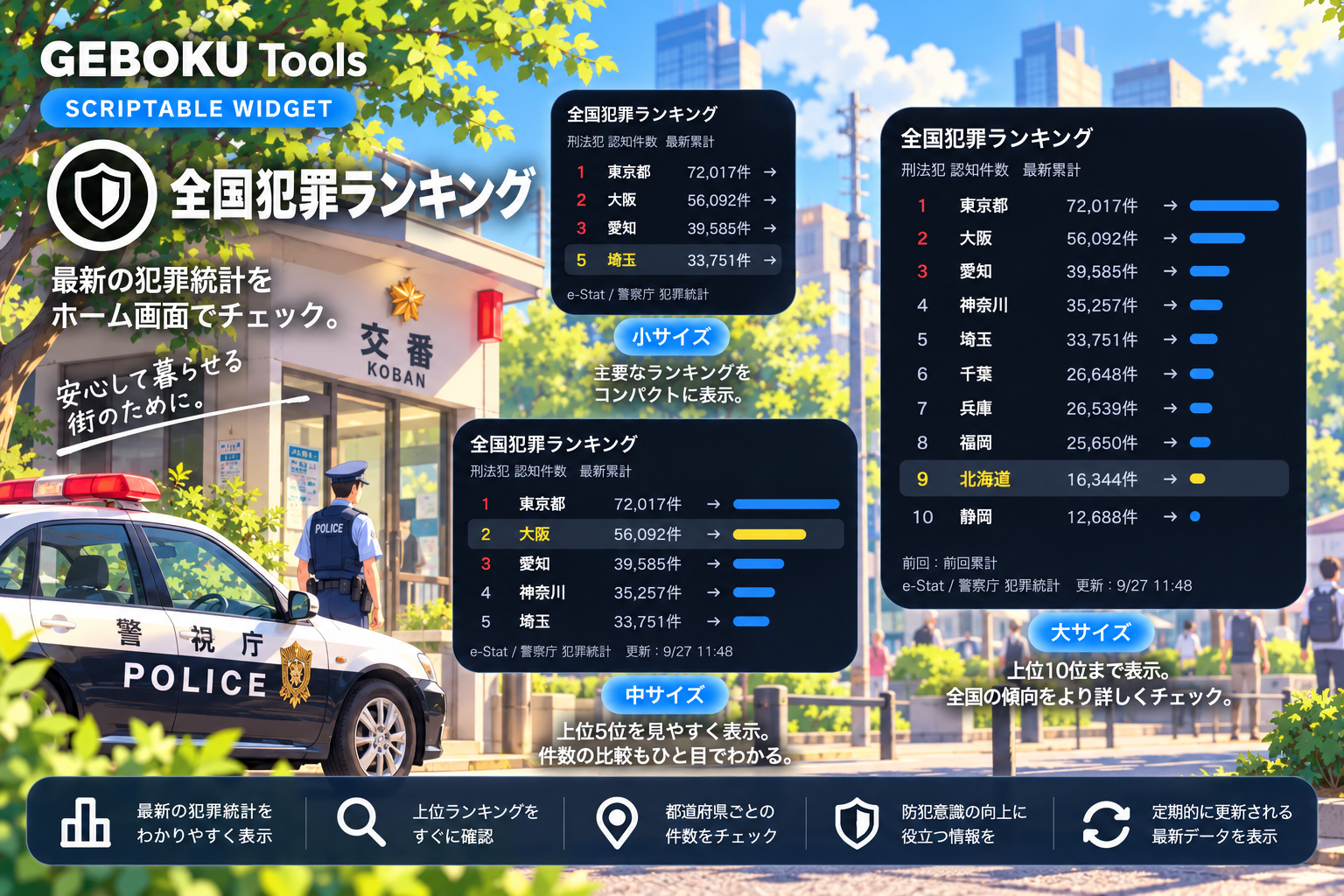
全国47都道府県の刑法犯認知件数をランキング形式で表示するScriptableウィジェットです。
警察庁「犯罪統計」のデータをe-Statから自動取得し、最新の累計件数をもとにランキングを表示します。
順位だけでなく、前回発表時から順位が上がったのか、下がったのかも矢印でひと目で確認できます。
さらに、ウィジェットをタップすると47都道府県すべてのランキングを一覧表示できます。
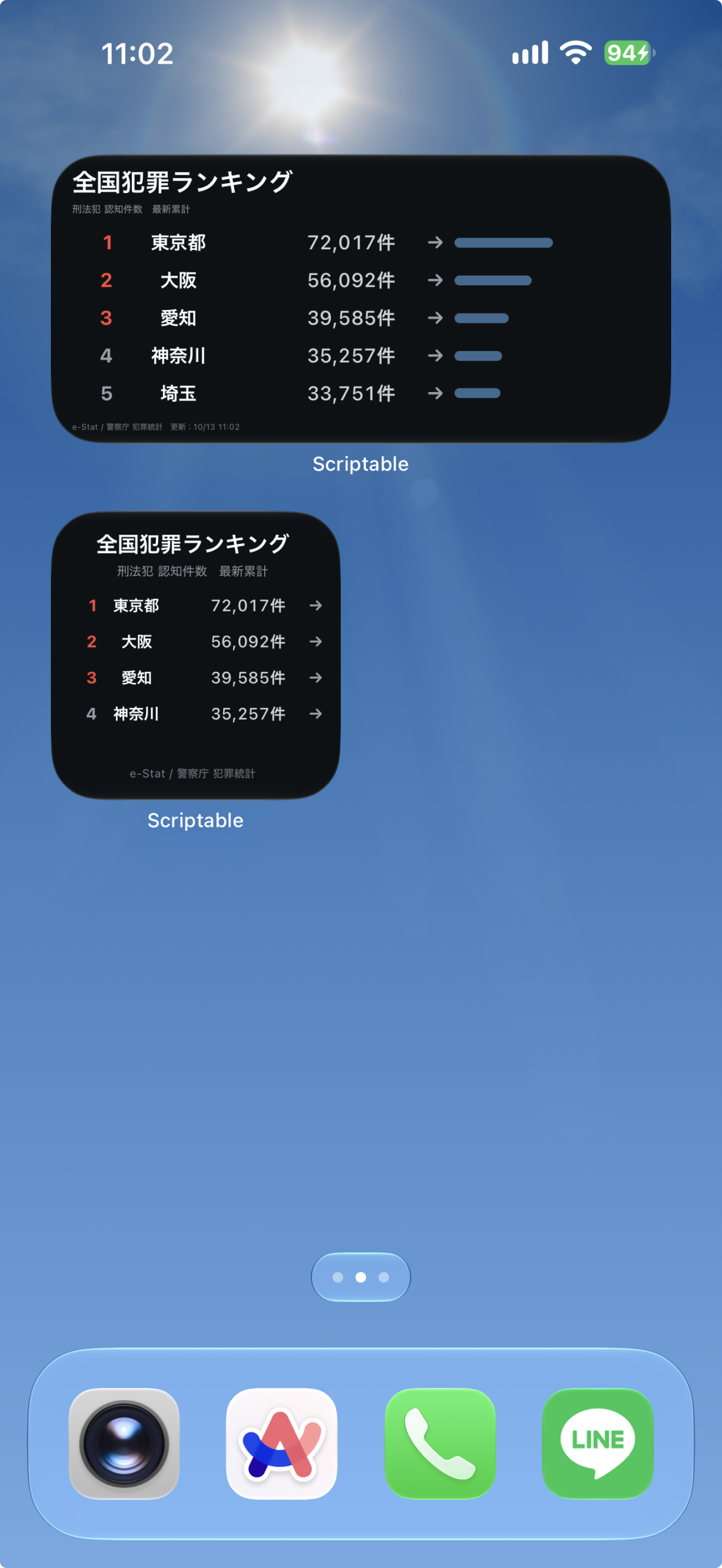
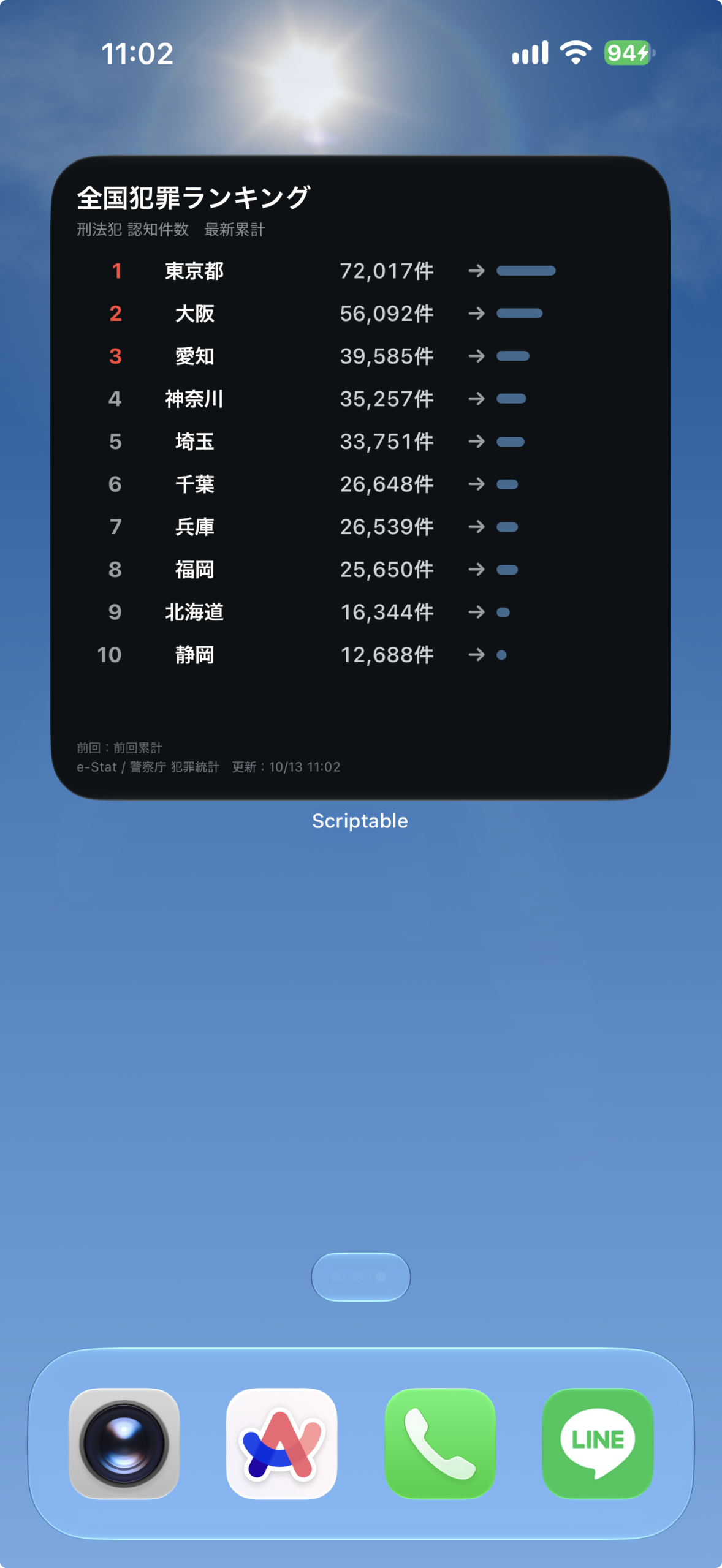
ウィジェットの表示内容
e-Statの犯罪認知件数を取得し、件数順に並べます。
サイズごとの表示
- 小:上位4都道府県、中:上位5都道府県、大:上位10都道府県を表示します。
- 中・大では件数の違いをバーでも表示し、大では比較情報も確認できます。
- タップすると全47都道府県の一覧を確認できます。
設定手順
上から順に進めてください。コードの保存と設定のコピーに必要な操作欄は、それぞれの手順の中にあります。
- Scriptableを用意する
App StoreでScriptableを開き、iPhoneにインストールします。すでに入っている場合は次へ進んでください。
- コードをコピーして保存する
下のコード欄の「コピー」を押します。Scriptableへ移動し、「+」から新しいスクリプトを作ってコード全文を貼り付け、全国犯罪ランキングなどの名前で保存してください。
保存したらこのページに戻り、次の手順へ進みます。
// Variables used by Scriptable. // These must be at the very top of the file. Do not edit. // icon-color: red; icon-glyph: chart-bar; // Version: 1.0.0 // ===================================================== // 全国犯罪ランキング - Scriptable Widget // // データ:e-Stat / 警察庁「犯罪統計」 // 第3表:刑法犯総数 都道府県別 // // ・最新+前回データを自動取得 // ・前回発表時からの順位変動を表示 // ・タップで47都道府県フル一覧を表示 // ・ウィジェットパラメータで「自分の県」をハイライト表示 // // ----------------------------------------------------- // 「自分の県」を表示する設定方法 // ----------------------------------------------------- // ホーム画面でウィジェットを長押し → 「ウィジェットを編集」 // → パラメータ欄に都道府県名を入力(例:"奈良" でも "奈良県" でもOK) // // ・TOP表示内に自分の県が入っている場合 // → その行がハイライト表示される // ・TOP表示外の場合 // → 区切り線の下に自分の県の実際の順位が追加表示される // ・パラメータが未設定の場合 // → 通常表示(今まで通り) // // 表示順 // 順位 | 都道府県 | 認知件数 | 順位変動 // // 小:TOP4 中:TOP5 大:TOP10 // (自分の県がTOP外の場合はいずれも1枠減らして自分の県を追加) // ===================================================== // ===================================================== // 設定 // ===================================================== const CONFIG = { SEARCH_URL: "https://www.e-stat.go.jp/stat-search/files", DOWNLOAD_URL: "https://www.e-stat.go.jp/stat-search/file-download", SEARCH_QUERY: "?cycle=0&layout=dataset&page=1&result_page=1" + "&tclass1val=0&toukei=00130001", REFRESH_MINUTES: 360, }; // ===================================================== // 47都道府県 // ===================================================== const PREFECTURES = [ "北海道", "青森県", "岩手県", "宮城県", "秋田県", "山形県", "福島県", "茨城県", "栃木県", "群馬県", "埼玉県", "千葉県", "東京都", "神奈川県", "新潟県", "富山県", "石川県", "福井県", "山梨県", "長野県", "岐阜県", "静岡県", "愛知県", "三重県", "滋賀県", "京都府", "大阪府", "兵庫県", "奈良県", "和歌山県", "鳥取県", "島根県", "岡山県", "広島県", "山口県", "徳島県", "香川県", "愛媛県", "高知県", "福岡県", "佐賀県", "長崎県", "熊本県", "大分県", "宮崎県", "鹿児島県", "沖縄県" ]; // ===================================================== // ウィジェットパラメータ → 都道府県名 正規化 // // "奈良" / "奈良県" / 前後の空白 などを吸収して // PREFECTURES 内の正式名称に変換する。 // 一致しない場合は null を返す。 // ===================================================== function normalizePrefectureInput(raw) { if (!raw) return null; let text = toHalfWidth(String(raw)).trim(); if (!text) return null; if (PREFECTURES.includes(text)) return text; const suffixes = ["都", "道", "府", "県"]; for (const suf of suffixes) { if (PREFECTURES.includes(text + suf)) return text + suf; } const partial = PREFECTURES.find((p) => p.startsWith(text)); if (partial) return partial; return null; } // ===================================================== // メイン // ===================================================== async function main() { try { const [latest, previous] = await findLatestDatasets(); const [latestCSV, previousCSV] = await Promise.all([ downloadCSV(latest.statInfId), downloadCSV(previous.statInfId), ]); const latestRanking = createRanking(latestCSV); const previousRanking = createRanking(previousCSV); if (latestRanking.length < 40) { throw new Error(`最新データの都道府県数が不足しています(${latestRanking.length}件)`); } if (previousRanking.length < 40) { throw new Error(`前回データの都道府県数が不足しています(${previousRanking.length}件)`); } // 前回順位MAP const previousMap = {}; for (const item of previousRanking) { previousMap[item.name] = item.rank; } // 順位変動 for (const item of latestRanking) { const oldRank = previousMap[item.name]; item.change = oldRank ? oldRank - item.rank : null; } const updatedAt = new Date(); // ウィジェットパラメータ(自分の県) const myPrefName = normalizePrefectureInput(args.widgetParameter); if (config.runsInWidget) { const widget = buildWidget(latestRanking, latest, previous, updatedAt, myPrefName); widget.refreshAfterDate = new Date(Date.now() + CONFIG.REFRESH_MINUTES * 60 * 1000); Script.setWidget(widget); } else { // ウィジェットをタップして開いた場合は47都道府県フル一覧を表示 await presentFullTable(latestRanking, latest, previous, updatedAt, myPrefName); } Script.complete(); } catch (error) { console.log(error); const widget = buildErrorWidget(error); if (config.runsInWidget) { Script.setWidget(widget); } else { await widget.presentMedium(); } Script.complete(); } } // ===================================================== // 最新・前回データセット検索 // ===================================================== async function findLatestDatasets() { const url = CONFIG.SEARCH_URL + CONFIG.SEARCH_QUERY; const req = new Request(url); req.headers = { "User-Agent": "Mozilla/5.0 (iPhone; CPU iPhone OS 18_0 like Mac OS X) AppleWebKit/605.1.15", }; const html = await req.loadString(); let datasets = extractDatasetsWithPeriods(html); // 期間が正しく抽出できたものだけを対象に、新しい順へソート const withPeriod = datasets.filter((d) => d.period !== null); withPeriod.sort((a, b) => b.period.sortKey - a.period.sortKey); if (withPeriod.length >= 2) { return [ { statInfId: withPeriod[0].statInfId, period: withPeriod[0].period.label }, { statInfId: withPeriod[1].statInfId, period: withPeriod[1].period.label }, ]; } // フォールバック:期間の紐付けに失敗した場合は検索結果の出現順を使う const ids = []; const idPattern = /(?:stat_infid|statInfId)=(\d{10,})/gi; let match; while ((match = idPattern.exec(html)) !== null) { if (!ids.includes(match[1])) ids.push(match[1]); } if (ids.length < 2) { throw new Error("比較用の犯罪統計を取得できませんでした"); } return [ { statInfId: ids[0], period: "最新累計" }, { statInfId: ids[1], period: "前回累計" }, ]; } // ===================================================== // statInfId と期間(年月)のセット抽出 // ===================================================== function extractDatasetsWithPeriods(html) { const idPattern = /(?:stat_infid|statInfId)=(\d{10,})/gi; const seen = new Set(); const result = []; let match; while ((match = idPattern.exec(html)) !== null) { const id = match[1]; if (seen.has(id)) continue; seen.add(id); const windowStart = Math.max(0, match.index - 400); const windowEnd = Math.min(html.length, match.index + 400); const windowText = html.slice(windowStart, windowEnd); result.push({ statInfId: id, period: extractPeriodFromText(windowText), }); } return result; } function extractPeriodFromText(text) { // 例:令和8年1〜8月犯罪統計 → 令和8年 / 1〜8月 const regex = /令和\s*([0-90-9]+)\s*年\s*([0-90-9]+)\s*[~〜\--]\s*([0-90-9]+)\s*月\s*犯罪統計/; const m = regex.exec(text); if (!m) return null; const reiwaYear = Number(toHalfWidth(m[1])); const startMonth = Number(toHalfWidth(m[2])); const endMonth = Number(toHalfWidth(m[3])); if (!Number.isFinite(reiwaYear) || !Number.isFinite(endMonth)) return null; if (endMonth < 1 || endMonth > 12) return null; // 令和1年 = 2019年 const gregorianYear = reiwaYear + 2018; return { sortKey: gregorianYear * 100 + endMonth, label: `${gregorianYear}年${startMonth}〜${endMonth}月`, }; } // ===================================================== // CSV取得 // ===================================================== async function downloadCSV(statInfId) { const url = CONFIG.DOWNLOAD_URL + `?statInfId=${encodeURIComponent(statInfId)}` + "&fileKind=1"; const req = new Request(url); req.headers = { "User-Agent": "Mozilla/5.0 (iPhone; CPU iPhone OS 18_0 like Mac OS X) AppleWebKit/605.1.15", "Accept": "text/csv,text/plain,*/*", }; req.timeoutInterval = 30; const csv = await req.loadString(); if (!csv || csv.length < 100) { throw new Error(`CSV取得失敗:${statInfId}`); } return csv; } // ===================================================== // ランキング生成(同数は同順位を付与) // ===================================================== function createRanking(csv) { const rows = parseCSV(csv); const tableIndex = findTable3(rows); if (tableIndex === -1) { throw new Error("第3表を発見できませんでした"); } const data = extractPrefectureData(rows, tableIndex); data.sort((a, b) => b.count - a.count); let currentRank = 0; let previousCount = null; data.forEach((item, index) => { if (item.count !== previousCount) { currentRank = index + 1; previousCount = item.count; } item.rank = currentRank; }); return data; } // ===================================================== // CSV解析 // ===================================================== function parseCSV(text) { text = text.replace(/^\uFEFF/, ""); const rows = []; let row = []; let field = ""; let inQuotes = false; for (let i = 0; i < text.length; i++) { const char = text[i]; const next = text[i + 1] || ""; if (char === '"') { if (inQuotes && next === '"') { field += '"'; i++; } else { inQuotes = !inQuotes; } continue; } if (char === "," && !inQuotes) { row.push(field); field = ""; continue; } if ((char === "\n" || char === "\r") && !inQuotes) { if (char === "\r" && next === "\n") i++; row.push(field); field = ""; if (row.some((v) => String(v).trim() !== "")) rows.push(row); row = []; continue; } field += char; } if (field.length || row.length) { row.push(field); if (row.some((v) => String(v).trim() !== "")) rows.push(row); } return rows; } // ===================================================== // 第3表検索 // ===================================================== function findTable3(rows) { for (let i = 0; i < rows.length; i++) { const line = rows[i].join("").replace(/\s+/g, ""); if (line.includes("第3表") || line.includes("第3表")) return i; } return -1; } // ===================================================== // 都道府県抽出 // ===================================================== function extractPrefectureData(rows, tableIndex) { const result = []; const end = Math.min(rows.length, tableIndex + 150); for (let i = tableIndex; i < end; i++) { const row = rows[i].map((v) => String(v).replace(/\r/g, "").replace(/\n/g, " ").trim() ); let prefecture = null; let prefIndex = -1; for (let c = 0; c < row.length; c++) { if (PREFECTURES.includes(row[c])) { prefecture = row[c]; prefIndex = c; break; } } if (!prefecture) continue; if (result.some((item) => item.name === prefecture)) continue; const numbers = []; for (let c = prefIndex + 1; c < row.length; c++) { const value = parseNumber(row[c]); if (value !== null) numbers.push(value); } if (!numbers.length) continue; const count = numbers[0]; if (!Number.isFinite(count) || count < 0) continue; result.push({ name: prefecture, count, rank: 0, change: 0 }); } return result; } // ===================================================== // 数値変換 // ===================================================== function parseNumber(value) { if (value === null || value === undefined) return null; let text = String(value).trim(); if (!text || text === "-" || text === "-") return null; text = toHalfWidth(text).replace(/,/g, "").replace(/[%%]/g, ""); if (!/^-?\d+(\.\d+)?$/.test(text)) return null; return Number(text); } // ===================================================== // 全角数字 → 半角 // ===================================================== function toHalfWidth(text) { return String(text).replace(/[0-9]/g, (char) => String.fromCharCode(char.charCodeAt(0) - 0xfee0) ); } // ===================================================== // ミニ棒グラフ画像の生成 // // 「背景色だけを持つ空のWidgetStack」で棒を表現する方法は // Scriptableで正しく描画されないことがあるため、 // DrawContextで実際に画像を描いてから配置する。 // ===================================================== function createBarImage(totalWidth, height, fillWidth, color) { const width = Math.max(1, Math.round(totalWidth)); const h = Math.max(1, Math.round(height)); const fw = Math.max(2, Math.min(width, Math.round(fillWidth))); const ctx = new DrawContext(); ctx.opaque = false; ctx.respectScreenScale = true; ctx.size = new Size(width, h); const path = new Path(); path.addRoundedRect(new Rect(0, 0, fw, h), h / 2, h / 2); ctx.addPath(path); ctx.setFillColor(color); ctx.fillPath(); return ctx.getImage(); } // ===================================================== // Widget // ===================================================== function buildWidget(ranking, latest, previous, updatedAt, myPrefName) { const widget = new ListWidget(); widget.backgroundColor = new Color("#0d1114"); const family = config.widgetFamily || "large"; let s; if (family === "small") { // 小サイズは元々余白がないためバーは追加しない(barWidth未設定) s = { limit: 4, padding: 12, title: 14, sub: 8, row: 10, rowHeight: 18, rowSpace: 4, rankWidth: 18, prefWidth: 48, countWidth: 67, changeWidth: 23, topSpace: 7, source: 7 }; } else if (family === "medium") { s = { limit: 5, padding: 13, title: 16, sub: 9, row: 12, rowHeight: 19, rowSpace: 4, rankWidth: 25, prefWidth: 80, countWidth: 92, changeWidth: 30, topSpace: 7, source: 7, barWidth: 60, barHeight: 6 }; } else { s = { limit: 10, padding: 16, title: 17, sub: 10, row: 13, rowHeight: 21, rowSpace: 5, rankWidth: 28, prefWidth: 88, countWidth: 102, changeWidth: 32, topSpace: 9, source: 8, barWidth: 36, barHeight: 6 }; } widget.setPadding(s.padding, s.padding, s.padding, s.padding); // タイトル(小サイズだけ中央) if (family === "small") { const titleRow = widget.addStack(); titleRow.addSpacer(); const title = titleRow.addText("全国犯罪ランキング"); title.font = Font.boldSystemFont(s.title); title.textColor = Color.white(); titleRow.addSpacer(); } else { const title = widget.addText("全国犯罪ランキング"); title.font = Font.boldSystemFont(s.title); title.textColor = Color.white(); } widget.addSpacer(3); // サブタイトル(小サイズだけ中央) if (family === "small") { const subRow = widget.addStack(); subRow.addSpacer(); const subtitle = subRow.addText(`刑法犯 認知件数 ${latest.period}`); subtitle.font = Font.systemFont(s.sub); subtitle.textColor = new Color("#8e949a"); subtitle.minimumScaleFactor = 0.65; subtitle.lineLimit = 1; subRow.addSpacer(); } else { const subtitle = widget.addText(`刑法犯 認知件数 ${latest.period}`); subtitle.font = Font.systemFont(s.sub); subtitle.textColor = new Color("#8e949a"); subtitle.minimumScaleFactor = 0.7; subtitle.lineLimit = 1; } widget.addSpacer(s.topSpace); // ----------------------------------------------------- // 表示するランキング行を決定 // // 自分の県がTOP表示外の場合は、表示件数を1つ減らして // 区切り線 + 自分の県の行 を末尾に追加する。 // ----------------------------------------------------- const myEntry = myPrefName ? ranking.find((r) => r.name === myPrefName) : null; const pinnedSeparately = !!(myEntry && myEntry.rank > s.limit); const display = pinnedSeparately ? ranking.slice(0, s.limit - 1) : ranking.slice(0, s.limit); const rowsData = display.map((item) => ({ item, isMine: !!(myEntry && item.name === myEntry.name), })); if (pinnedSeparately) { rowsData.push({ divider: true }); rowsData.push({ item: myEntry, isMine: true }); } // ミニ棒グラフ用:表示中の最大件数を100%として長さを決める const maxCount = Math.max( ...rowsData.filter((r) => r.item).map((r) => r.item.count) ); for (let i = 0; i < rowsData.length; i++) { const entry = rowsData[i]; if (entry.divider) { const divider = widget.addStack(); divider.size = new Size(0, 1); divider.backgroundColor = new Color("#2a2f34"); widget.addSpacer(s.rowSpace); continue; } const item = entry.item; const isMine = entry.isMine; const row = widget.addStack(); row.layoutHorizontally(); row.centerAlignContent(); if (isMine) { row.backgroundColor = new Color("#22303c"); row.cornerRadius = 6; // 左右のパディングを入れると他の行と列位置がズレるため、 // 上下のみパディングを付ける(横方向は0のまま)。 row.setPadding(2, 0, 2, 0); } // 順位 // ※ layoutHorizontally() + centerAlignContent() にしないと、 // addSpacer() が縦方向に効いてしまい文字が上下センターにならない。 const rankStack = row.addStack(); rankStack.layoutHorizontally(); rankStack.centerAlignContent(); rankStack.size = new Size(s.rankWidth, s.rowHeight); rankStack.addSpacer(); const rank = rankStack.addText(String(item.rank)); rank.font = Font.boldSystemFont(s.row); rank.textColor = isMine ? new Color("#ffd60a") : item.rank <= 3 ? new Color("#ff453a") : new Color("#9ba1a6"); rank.rightAlignText(); // 都道府県 const prefStack = row.addStack(); prefStack.layoutHorizontally(); prefStack.centerAlignContent(); prefStack.size = new Size(s.prefWidth, s.rowHeight); const pref = prefStack.addText(shortenPrefecture(item.name)); pref.font = Font.boldSystemFont(s.row); pref.textColor = isMine ? new Color("#ffd60a") : Color.white(); pref.lineLimit = 1; // 件数(数字は等幅、単位は通常フォント) const countStack = row.addStack(); countStack.layoutHorizontally(); countStack.centerAlignContent(); countStack.size = new Size(s.countWidth, s.rowHeight); countStack.addSpacer(); const countNumber = countStack.addText(formatNumber(item.count)); countNumber.font = Font.mediumMonospacedSystemFont(s.row); countNumber.textColor = new Color("#d0d4d7"); countNumber.lineLimit = 1; const countUnit = countStack.addText("件"); countUnit.font = Font.semiboldSystemFont(s.row); countUnit.textColor = new Color("#d0d4d7"); countUnit.lineLimit = 1; // 順位変動 const changeStack = row.addStack(); changeStack.layoutHorizontally(); changeStack.centerAlignContent(); changeStack.size = new Size(s.changeWidth, s.rowHeight); changeStack.addSpacer(); const changeInfo = formatChange(item.change); const change = changeStack.addText(changeInfo.text); change.font = Font.boldSystemFont(s.row); change.textColor = changeInfo.color; change.rightAlignText(); // ミニ棒グラフ(中・大サイズの余白を使って件数を視覚化) if (s.barWidth) { row.addSpacer(6); const barLength = Math.max( 3, Math.round((item.count / maxCount) * s.barWidth) ); const barColor = isMine ? new Color("#ffd60a") : new Color("#3d6a91"); const barImage = createBarImage(s.barWidth, s.barHeight, barLength, barColor); const barImageWidget = row.addImage(barImage); barImageWidget.imageSize = new Size(s.barWidth, s.barHeight); } if (i < rowsData.length - 1) widget.addSpacer(s.rowSpace); } widget.addSpacer(); // 前回(大サイズのみ) if (family === "large") { const compare = widget.addText(`前回:${previous.period}`); compare.font = Font.systemFont(8); compare.textColor = new Color("#646b71"); widget.addSpacer(2); } // 出典 + 最終更新時刻 const footerText = `e-Stat / 警察庁 犯罪統計 更新:${formatTimestamp(updatedAt)}`; if (family === "small") { const sourceRow = widget.addStack(); sourceRow.addSpacer(); const source = sourceRow.addText("e-Stat / 警察庁 犯罪統計"); source.font = Font.systemFont(s.source); source.textColor = new Color("#747b82"); sourceRow.addSpacer(); } else { const source = widget.addText(footerText); source.font = Font.systemFont(s.source); source.textColor = new Color("#747b82"); source.lineLimit = 1; source.minimumScaleFactor = 0.7; } return widget; } // ===================================================== // タップ時:47都道府県フル一覧 // ===================================================== async function presentFullTable(ranking, latest, previous, updatedAt, myPrefName) { const table = new UITable(); table.showSeparators = true; const myEntry = myPrefName ? ranking.find((r) => r.name === myPrefName) : null; const headerRow = new UITableRow(); headerRow.isHeader = true; const headerSubtitle = myEntry ? `${latest.period}/前回:${previous.period}/あなたの県:${myEntry.name} ${myEntry.rank}位` : `${latest.period}/前回:${previous.period}`; headerRow.addText("全国犯罪ランキング(全47都道府県)", headerSubtitle); table.addRow(headerRow); for (const item of ranking) { const row = new UITableRow(); const isMine = !!(myEntry && item.name === myEntry.name); if (isMine) { // ライトモード/ダークモードどちらでも視認できる色に // Color.dynamic(ライト時の色, ダーク時の色) row.backgroundColor = Color.dynamic( new Color("#fff2b8"), new Color("#4a3b00") ); } const rankCell = row.addText(String(item.rank)); rankCell.widthWeight = 10; const nameCell = row.addText(item.name); nameCell.widthWeight = 28; if (isMine) { const highlightTextColor = Color.dynamic( new Color("#7a5b00"), new Color("#ffd60a") ); rankCell.textColor = highlightTextColor; nameCell.textColor = highlightTextColor; } const countCell = row.addText(`${formatNumber(item.count)}件`); countCell.widthWeight = 32; const changeInfo = formatChange(item.change); const changeCell = row.addText(changeInfo.text); changeCell.widthWeight = 15; row.cellSpacing = 4; table.addRow(row); } await table.present(false); } // ===================================================== // 順位変動(変動なし/前回データなしを色分け) // ===================================================== function formatChange(value) { if (value === null || value === undefined) { // 前回データに存在しない(新設・統合などで対応不可) return { text: "―", color: new Color("#4a4f54") }; } if (value > 0) { return { text: `↑${value}`, color: new Color("#ff453a") }; } if (value < 0) { return { text: `↓${Math.abs(value)}`, color: new Color("#32d74b") }; } // 変動なし return { text: "→", color: new Color("#9ba1a6") }; } // ===================================================== // 都道府県名短縮 // ===================================================== function shortenPrefecture(name) { if (name === "北海道") return "北海道"; if (name === "東京都") return "東京都"; return name.replace(/[府県]$/, ""); } // ===================================================== // 数値・日時フォーマット // ===================================================== function formatNumber(value) { return Number(value).toLocaleString("ja-JP"); } function formatTimestamp(date) { return date.toLocaleString("ja-JP", { month: "numeric", day: "numeric", hour: "2-digit", minute: "2-digit", }); } // ===================================================== // エラーWidget // ===================================================== function buildErrorWidget(error) { const widget = new ListWidget(); widget.backgroundColor = new Color("#0d1114"); widget.setPadding(16, 16, 16, 16); const title = widget.addText("全国犯罪ランキング"); title.font = Font.boldSystemFont(16); title.textColor = Color.white(); widget.addSpacer(8); const errorTitle = widget.addText("データ取得エラー"); errorTitle.font = Font.boldSystemFont(14); errorTitle.textColor = new Color("#ff453a"); widget.addSpacer(5); const message = widget.addText(String(error)); message.font = Font.systemFont(10); message.textColor = new Color("#d0d4d7"); message.lineLimit = 7; return widget; } // ===================================================== // 実行 // ===================================================== await main(); - Parameterに設定を入力する
ウィジェットを長押しして「ウィジェットを編集」を開き、「Parameter」に強調表示したい都道府県名を入力します。例:
東京都。「東京」でも指定できます。強調表示が不要なら空欄で構いません。 - ホーム画面に追加して設定する
iPhoneのホーム画面を長押しし、ウィジェット追加画面からScriptableを選びます。この記事の対応サイズの説明に合わせてサイズを選んで追加してください。
追加したウィジェットを長押しして「ウィジェットを編集」を開き、「Script」に保存したスクリプトを選びます。
「Parameter」に上で案内した値を直接入力します。 設定を変えるときは、この欄を書き換えてください。
編集画面を閉じて表示を確認します。ホーム画面への反映には少し時間がかかる場合があります。
順位変動について
順位の横に表示される矢印は、前回発表時との比較です。
↑2なら前回から2ランク上昇、↓1なら1ランク下降、→なら順位変動なしを表します。
赤・緑の色分けもしているので、ランキングの変化がすぐに分かります。
動作確認・使用結果
| 確認した端末 | iPhone 17 ProMAX |
|---|---|
| iOS | iOS27 |
| Scriptable | 1.7.19 |
| 確認したサイズ | 小・中・大 |
| バージョン | 1.0.0 |
| 動作確認日 | 2026-09-28 |
表示・使用時のポイント
e-Statの犯罪認知件数を取得し、件数順に並べます。指定した都道府県はランキング内で強調します。
更新履歴
1.0.0
- 初回リリース
よくあるエラーと対処
- 確認すること
- 表示されない場合は、ウィジェット編集画面の「Script」に保存したスクリプトが選ばれているかも確認してください。コードを貼り直すときは全文を置き換えます。
- 指定地域が上位に出ない
- 強調表示は順位を変えません。上位に入っていない場合は全47都道府県の一覧を確認してください。
- CSVや表が見つからないエラーになる
- 提供元の表やファイル構成が変わった可能性があります。時間を置いても続く場合はコード側の対応が必要です。
注意事項・制限
- このウィジェットの数値は、警察庁が公表する刑法犯の認知件数をもとにしています。
「犯罪が実際に発生したすべての件数」や「人口あたりの犯罪率」を示すものではありません。
また、単純な認知件数ランキングなので、人口の多い都道府県ほど件数が多くなりやすい点にも注意してください。
地域の治安そのものを順位付けするものではなく、公表されている犯罪統計を気軽にチェックするためのウィジェットとしてご利用ください。 - 件数のランキングです。人口当たりの犯罪率ではありません。
- 対象期間の統計であり、その地域の現在の安全性を直接判定するものではありません。
- ホーム画面の更新タイミングはiOSが管理するため、操作やデータの変更がすぐに反映されない場合があります。
データ提供・参考資料
e-Stat 政府統計の総合窓口:警察庁の犯罪認知件数に関する統計表を取得しています。
SHARE