「明日って何ゴミだっけ?」
曜日や第○週など、意外と覚えておくのが面倒なゴミの収集日。
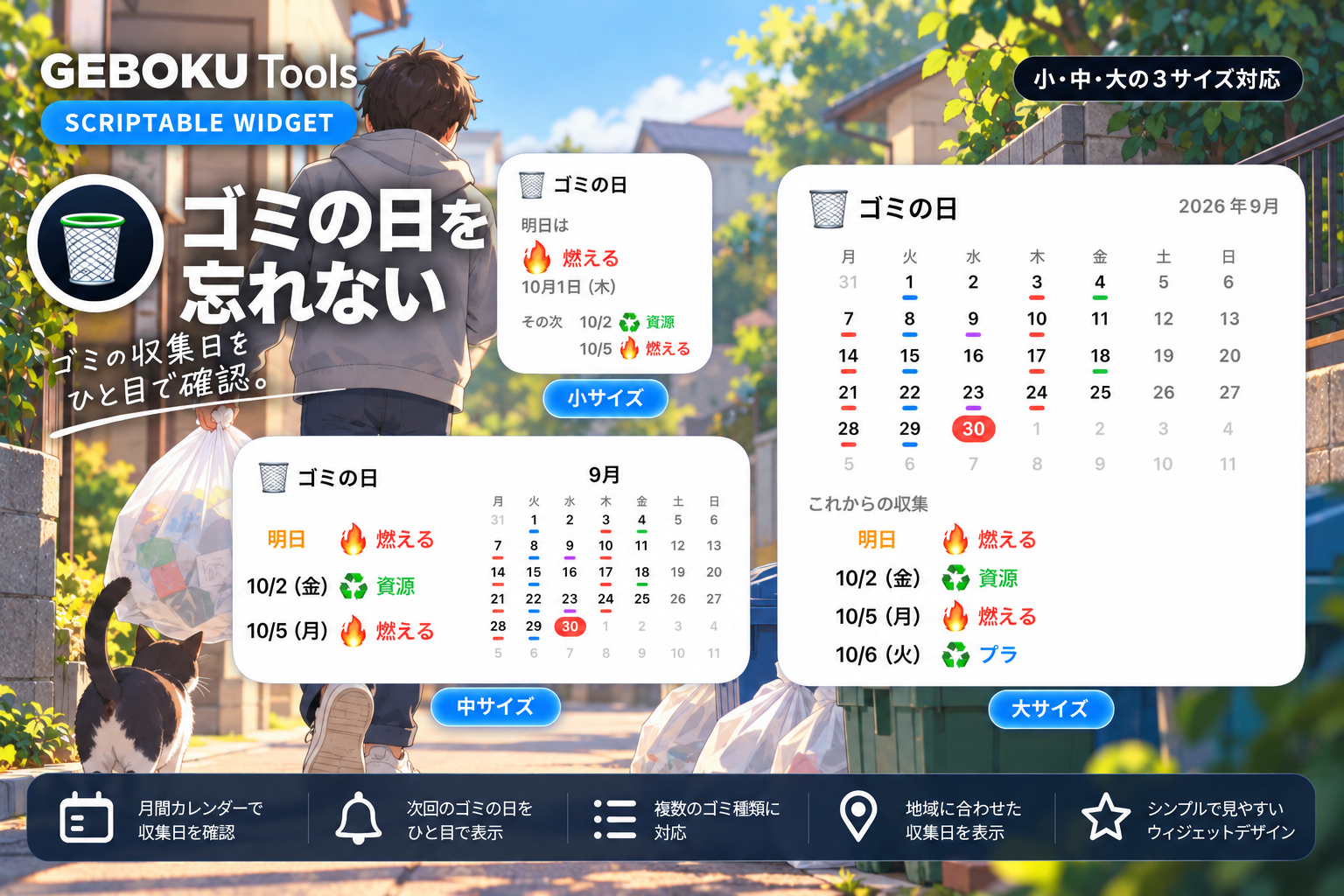
「ゴミの日」は、設定した収集スケジュールから次のゴミの日を自動で表示するScriptableウィジェットです。
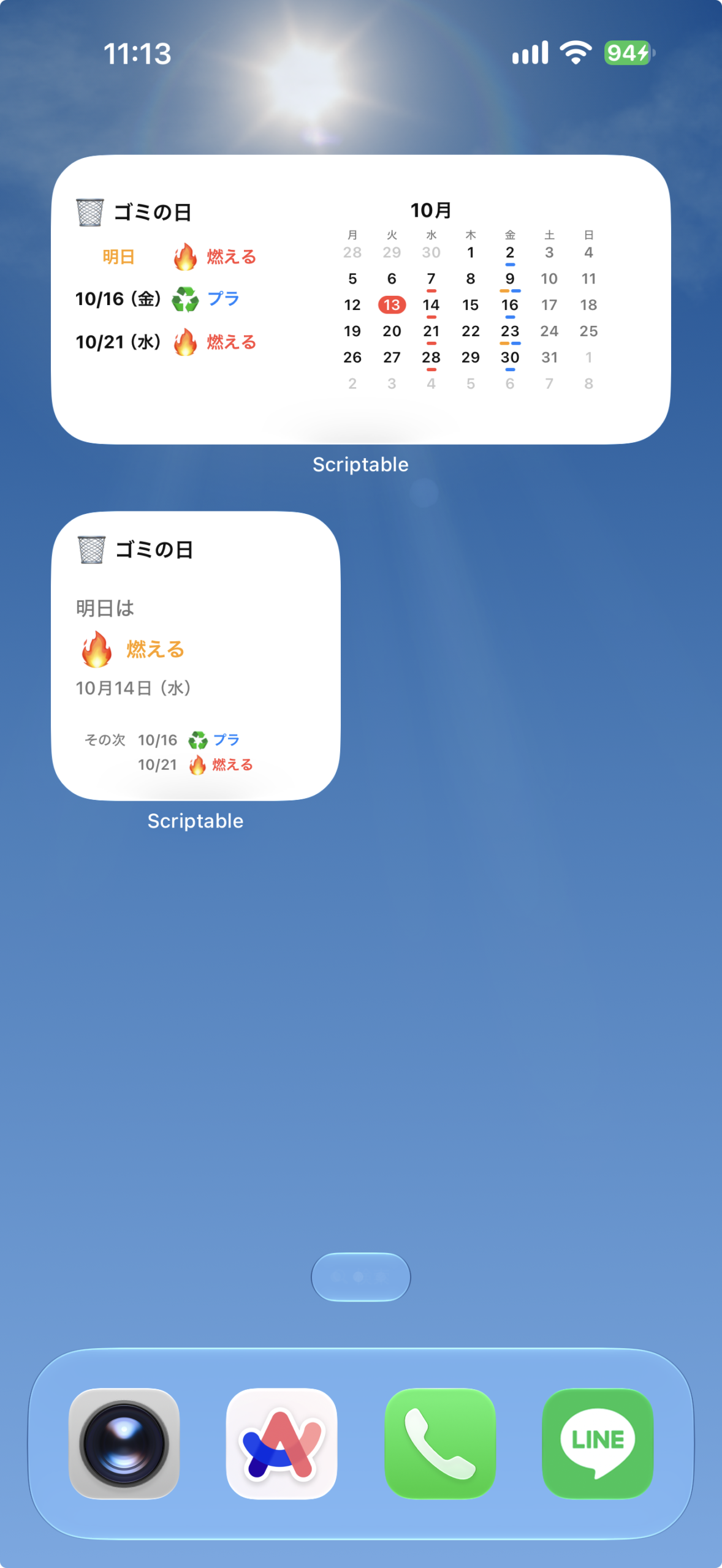
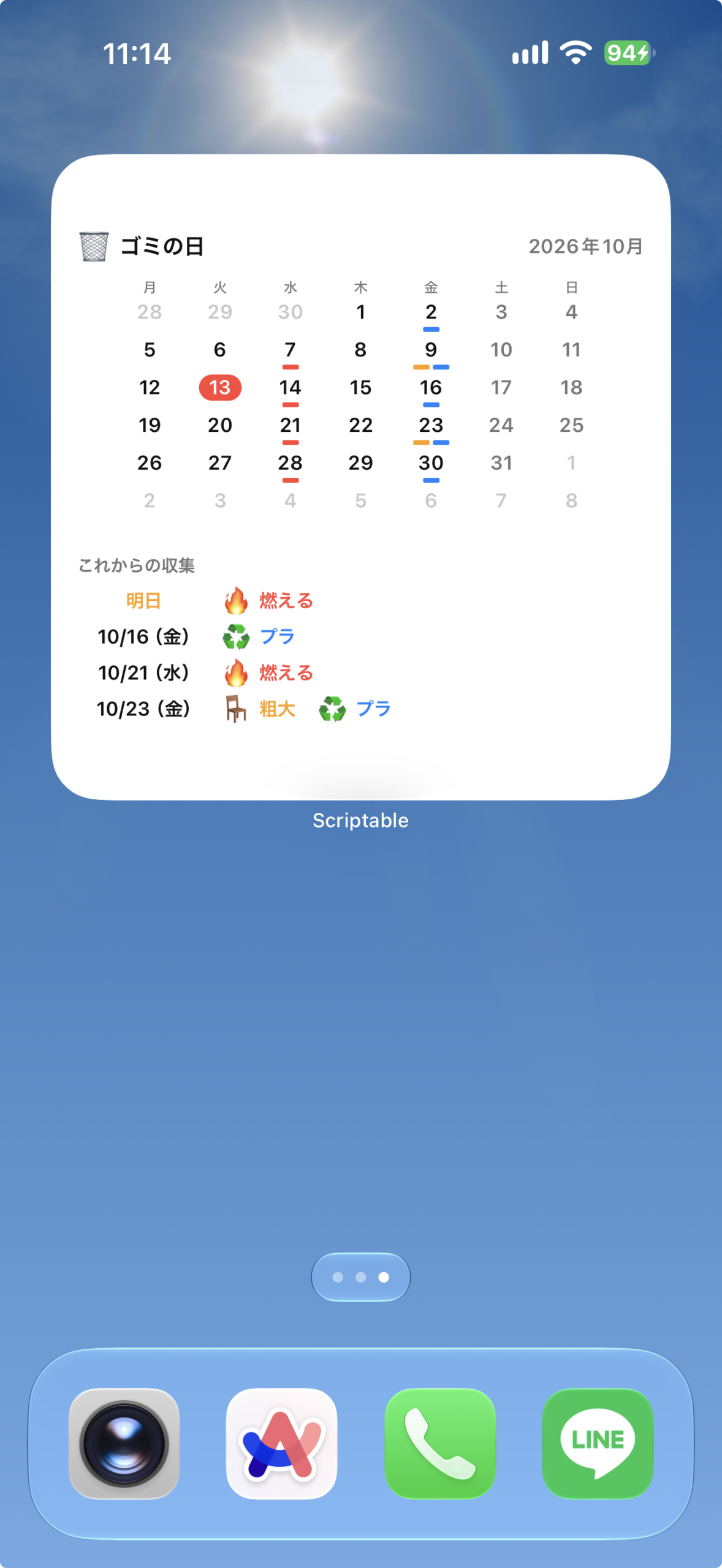
小サイズでは次の収集日をシンプルに、中・大サイズでは月間カレンダーでも確認できます。
ウィジェットの表示内容
自分で登録した曜日・週・種類から収集予定を作ります。
サイズごとの表示
- 小:次の収集日とゴミの種類を表示します。
- 中:月間カレンダーなどで収集予定を確認できます。
- 大:月間カレンダーと今後の収集予定を広く表示します。
設定手順
上から順に進めてください。コードの保存と設定のコピーに必要な操作欄は、それぞれの手順の中にあります。
- Scriptableを用意する
App StoreでScriptableを開き、iPhoneにインストールします。すでに入っている場合は次へ進んでください。
- コードをコピーして保存する
下のコード欄の「コピー」を押します。Scriptableへ移動し、「+」から新しいスクリプトを作ってコード全文を貼り付け、ゴミの日を忘れないなどの名前で保存してください。
保存したらこのページに戻り、次の手順へ進みます。
// Variables used by Scriptable. // These must be at the very top of the file. Do not edit. // icon-color: green; icon-glyph: trash-alt; // Version: 1.0.0 // ===================================================== // ゴミの日 - Scriptable Widget V9 // // Parameter: // ゴミ名:収集日,ゴミ名:収集日,... // // 例: // 燃える:月木,プラ:火,燃えない:2・4水,資源:1・3金 // // 対応: // 月木 → 毎週 月曜・木曜 // 火 → 毎週 火曜 // 2水 → 第2水曜 // 1・3金 → 第1・第3金曜 // // 小:次回収集+その後2件 // 中:左=直近3件 / 右=月間カレンダー // 大:月間カレンダー+直近4件 // // カレンダー: // ・7列×6週(42日)固定サイズのセル // ・前月 / 翌月は薄いグレー(収集ラインなし) // ・今日=赤背景+白文字 // ===================================================== // ===================================================== // 設定 // ===================================================== const DEFAULT_PARAMETER = "燃える:月木,プラ:火,燃えない:2・4水,資源:1・3金"; const SEARCH_DAYS = 70; const WEEKDAY_JP = ["日", "月", "火", "水", "木", "金", "土"]; // ===================================================== // カラー // ===================================================== const C = { bg: Color.dynamic(new Color("#FFFFFF"), new Color("#161616")), text: Color.dynamic(new Color("#111111"), new Color("#FFFFFF")), sub: Color.dynamic(new Color("#777777"), new Color("#999999")), outside: Color.dynamic(new Color("#C8C8C8"), new Color("#555555")), line: Color.dynamic(new Color("#E8E8E8"), new Color("#333333")), todayBG: new Color("#FF453A"), todayText: new Color("#FFFFFF"), tomorrow: new Color("#FF9F0A"), red: new Color("#FF453A"), blue: new Color("#0A84FF"), green: new Color("#30D158"), purple: new Color("#BF5AF2"), orange: new Color("#FF9F0A") }; // ===================================================== // PARAMETER // ===================================================== const parameter = args.widgetParameter && args.widgetParameter.trim() ? args.widgetParameter.trim() : DEFAULT_PARAMETER; const rules = parseParameter(parameter); // ===================================================== // DATE // ===================================================== const now = new Date(); const today = startOfDay(now); const tomorrow = addDays(today, 1); // ===================================================== // UPCOMING // ===================================================== const schedule = []; for (let i = 0; i < SEARCH_DAYS; i++) { const date = addDays(today, i); const items = getGarbageForDate(date); for (const item of items) { schedule.push({ date, ...item }); } } const groupedSchedule = groupSchedule(schedule); // ===================================================== // WIDGET // ===================================================== const widget = new ListWidget(); widget.backgroundColor = C.bg; if (config.widgetFamily === "small") { widget.setPadding(15, 15, 15, 15); buildSmall(widget); } else if (config.widgetFamily === "medium") { widget.setPadding(13, 14, 13, 14); buildMedium(widget); } else { widget.setPadding(15, 16, 15, 16); buildLarge(widget); } Script.setWidget(widget); if (!config.runsInWidget) { await widget.presentLarge(); } Script.complete(); // ===================================================== // SMALL // ===================================================== function buildSmall(widget) { addHeader(widget); widget.addSpacer(); const todayItems = getGarbageForDate(today); const tomorrowItems = getGarbageForDate(tomorrow); let mainDate = null; let mainItems = []; let mainLabel = ""; let forceColor = null; if (todayItems.length) { mainDate = today; mainItems = todayItems; mainLabel = "今日は"; forceColor = C.red; } else if (tomorrowItems.length) { mainDate = tomorrow; mainItems = tomorrowItems; mainLabel = "明日は"; forceColor = C.tomorrow; } else if (groupedSchedule.length) { mainDate = groupedSchedule[0].date; mainItems = groupedSchedule[0].items; mainLabel = "次の収集"; } if (!mainDate) { addNoSchedule(widget); return; } const label = widget.addText(mainLabel); label.font = Font.mediumSystemFont(13); label.textColor = C.sub; widget.addSpacer(4); addMainGarbage(widget, mainItems, forceColor); widget.addSpacer(4); addSmallDate(widget, mainDate); const following = groupedSchedule .filter(group => group.date > mainDate) .slice(0, 2); if (!following.length) return; widget.addSpacer(); for (let i = 0; i < following.length; i++) { addSmallNextRow(widget, following[i], i === 0); if (i < following.length - 1) widget.addSpacer(2); } } function addSmallNextRow(parent, group, showLabel) { const row = parent.addStack(); row.centerAlignContent(); const labelBox = row.addStack(); labelBox.size = new Size(36, 0); const label = labelBox.addText(showLabel ? "その次" : ""); label.font = Font.mediumSystemFont(9); label.textColor = C.sub; row.addSpacer(2); const date = row.addText(formatTinyDate(group.date)); date.font = Font.semiboldSystemFont(9); date.textColor = C.sub; row.addSpacer(5); const item = group.items[0]; const icon = row.addText(item.icon); icon.font = Font.systemFont(10); row.addSpacer(2); const name = row.addText(item.name); name.font = Font.semiboldSystemFont(9); name.textColor = item.color; name.lineLimit = 1; name.minimumScaleFactor = 0.6; } function addMainGarbage(widget, items, forceColor) { for (let i = 0; i < Math.min(items.length, 2); i++) { const item = items[i]; const row = widget.addStack(); row.centerAlignContent(); const icon = row.addText(item.icon); icon.font = Font.systemFont(22); row.addSpacer(5); const name = row.addText(item.name); name.font = Font.boldSystemFont(18); name.textColor = forceColor || item.color; name.lineLimit = 1; name.minimumScaleFactor = 0.6; if (i === 0 && items.length > 1) widget.addSpacer(3); } } function addSmallDate(widget, date) { const text = widget.addText(formatFullDate(date)); text.font = Font.mediumSystemFont(11); text.textColor = C.sub; } // ===================================================== // MEDIUM // ===================================================== function buildMedium(widget) { const main = widget.addStack(); main.layoutHorizontally(); // LEFT const left = main.addStack(); left.layoutVertically(); left.size = new Size(125, 0); addHeader(left); left.addSpacer(10); const upcoming = groupedSchedule.slice(0, 3); for (let i = 0; i < upcoming.length; i++) { addMediumSchedule(left, upcoming[i]); if (i < upcoming.length - 1) left.addSpacer(9); } main.addSpacer(9); // RIGHT const right = main.addStack(); right.layoutVertically(); buildCalendar(right, today.getFullYear(), today.getMonth(), "medium"); } function addMediumSchedule(parent, group) { const row = parent.addStack(); row.centerAlignContent(); const dateBox = row.addStack(); dateBox.size = new Size(55, 0); const date = dateBox.addText(getRelativeDateLabel(group.date)); date.font = Font.boldSystemFont(11); date.textColor = dateColor(group.date); row.addSpacer(3); const item = group.items[0]; const icon = row.addText(item.icon); icon.font = Font.systemFont(14); row.addSpacer(3); const name = row.addText(item.name); name.font = Font.semiboldSystemFont(11); name.textColor = item.color; name.lineLimit = 1; name.minimumScaleFactor = 0.55; } // ===================================================== // LARGE // ===================================================== function buildLarge(widget) { const header = widget.addStack(); header.centerAlignContent(); const icon = header.addText("🗑"); icon.font = Font.systemFont(15); header.addSpacer(5); const title = header.addText("ゴミの日"); title.font = Font.boldSystemFont(14); title.textColor = C.text; header.addSpacer(); const month = header.addText( `${today.getFullYear()}年${today.getMonth() + 1}月` ); month.font = Font.semiboldSystemFont(12); month.textColor = C.sub; widget.addSpacer(9); buildCalendar(widget, today.getFullYear(), today.getMonth(), "large"); widget.addSpacer(9); const divider = widget.addStack(); divider.size = new Size(0, 1); divider.backgroundColor = C.line; widget.addSpacer(8); const nextTitle = widget.addText("これからの収集"); nextTitle.font = Font.boldSystemFont(11); nextTitle.textColor = C.sub; widget.addSpacer(6); const upcoming = groupedSchedule.slice(0, 4); for (let i = 0; i < upcoming.length; i++) { addLargeSchedule(widget, upcoming[i]); if (i < upcoming.length - 1) widget.addSpacer(5); } } function addLargeSchedule(parent, group) { const row = parent.addStack(); row.centerAlignContent(); const dateStack = row.addStack(); dateStack.size = new Size(82, 0); const date = dateStack.addText(getRelativeDateLabel(group.date)); date.font = Font.semiboldSystemFont(12); date.textColor = dateColor(group.date); row.addSpacer(5); for (let i = 0; i < group.items.length; i++) { const item = group.items[i]; if (i > 0) row.addSpacer(12); const icon = row.addText(item.icon); icon.font = Font.systemFont(14); row.addSpacer(4); const name = row.addText(item.name); name.font = Font.semiboldSystemFont(12); name.textColor = item.color; } } // ===================================================== // CALENDAR(DrawContextで画像として描画) // // Stackのレイアウトはサイズが勝手に縮むことがあるため、 // カレンダーは座標を直接指定して1枚の画像に描く。 // ===================================================== function calendarMetrics(isMedium) { const W = isMedium ? 168 : 300; const headH = isMedium ? 10 : 14; const cellH = isMedium ? 16 : 23; return { W, headH, cellH, H: headH + cellH * 6 }; } function buildCalendar(parent, year, month, size) { const isMedium = size === "medium"; const m = calendarMetrics(isMedium); const container = parent.addStack(); container.layoutVertically(); // 中サイズの月タイトル if (isMedium) { const titleRow = container.addStack(); titleRow.size = new Size(m.W, 0); titleRow.addSpacer(); const title = titleRow.addText(`${month + 1}月`); title.font = Font.boldSystemFont(12); title.textColor = C.text; titleRow.addSpacer(); container.addSpacer(3); } const img = drawCalendarImage(year, month, m, isMedium); const row = container.addStack(); row.addSpacer(); const view = row.addImage(img); view.imageSize = new Size(m.W, m.H); row.addSpacer(); } function drawCalendarImage(year, month, m, isMedium) { const dark = Device.isUsingDarkAppearance(); const col = { text: new Color(dark ? "#FFFFFF" : "#111111"), sub: new Color(dark ? "#999999" : "#777777"), outside: new Color(dark ? "#555555" : "#C8C8C8") }; const dc = new DrawContext(); dc.size = new Size(m.W, m.H); dc.opaque = false; dc.respectScreenScale = true; const cellW = m.W / 7; const fs = isMedium ? 9 : 12; // 日付の文字サイズ const wfs = isMedium ? 7 : 9; // 曜日の文字サイズ const numH = isMedium ? 11 : 16; // 数字(今日の丸)の高さ const numW = isMedium ? 17 : 26; // 今日の丸の幅 const barW = isMedium ? 6 : 10; const barH = isMedium ? 2 : 3; const barGap = isMedium ? 1 : 2; // 曜日 const weekdays = ["月", "火", "水", "木", "金", "土", "日"]; dc.setTextAlignedCenter(); dc.setFont(Font.mediumSystemFont(wfs)); dc.setTextColor(col.sub); for (let c = 0; c < 7; c++) { dc.drawTextInRect( weekdays[c], new Rect(c * cellW, (m.headH - wfs * 1.25) / 2, cellW, wfs * 1.4) ); } // 日付(42日) const firstDay = new Date(year, month, 1); const firstIndex = (firstDay.getDay() + 6) % 7; const calendarStart = addDays(firstDay, -firstIndex); for (let week = 0; week < 6; week++) { const y0 = m.headH + week * m.cellH; for (let c = 0; c < 7; c++) { const date = addDays(calendarStart, week * 7 + c); const inMonth = date.getFullYear() === year && date.getMonth() === month; const isToday = isSameDay(date, today); const x0 = c * cellW; // 今日の赤い丸 if (isToday) { const path = new Path(); path.addRoundedRect( new Rect(x0 + (cellW - numW) / 2, y0, numW, numH), numH / 2, numH / 2 ); dc.addPath(path); dc.setFillColor(C.todayBG); dc.fillPath(); } // 数字 dc.setFont(Font.semiboldSystemFont(fs)); if (isToday) dc.setTextColor(C.todayText); else if (!inMonth) dc.setTextColor(col.outside); else if (c >= 5) dc.setTextColor(col.sub); else dc.setTextColor(col.text); dc.drawTextInRect( String(date.getDate()), new Rect(x0, y0 + (numH - fs * 1.25) / 2, cellW, fs * 1.4) ); // 収集ライン(当月のみ) if (inMonth) { const items = getGarbageForDate(date).slice(0, 3); if (items.length) { const totalW = items.length * barW + (items.length - 1) * barGap; let bx = x0 + (cellW - totalW) / 2; const by = y0 + numH + 1; for (const item of items) { const bp = new Path(); bp.addRoundedRect(new Rect(bx, by, barW, barH), 1, 1); dc.addPath(bp); dc.setFillColor(item.color); dc.fillPath(); bx += barW + barGap; } } } } } return dc.getImage(); } // ===================================================== // 指定日のゴミ // ===================================================== function getGarbageForDate(date) { const result = []; for (const rule of rules) { if (!matchesRule(date, rule)) continue; if (result.some(x => x.name === rule.name)) continue; result.push({ name: rule.name, icon: getGarbageIcon(rule.name), color: getGarbageColor(rule.name) }); } return result; } // ===================================================== // HEADER // ===================================================== function addHeader(parent) { const header = parent.addStack(); header.centerAlignContent(); const icon = header.addText("🗑"); icon.font = Font.systemFont(14); header.addSpacer(4); const title = header.addText("ゴミの日"); title.font = Font.boldSystemFont(13); title.textColor = C.text; } // ===================================================== // PARAMETER PARSER // ===================================================== function parseParameter(parameter) { const result = []; const entries = parameter .replace(/,/g, ",") .split(",") .map(x => x.trim()) .filter(Boolean); for (const entry of entries) { let separator = null; if (entry.includes(":")) separator = ":"; else if (entry.includes(":")) separator = ":"; if (!separator) continue; const index = entry.indexOf(separator); const name = entry.slice(0, index).trim(); const ruleText = entry.slice(index + 1).trim(); if (!name || !ruleText) continue; const parsed = parseRuleText(ruleText); for (const rule of parsed) { result.push({ name, ...rule }); } } return result; } // ===================================================== // RULE PARSER // ===================================================== function parseRuleText(text) { const result = []; const normalized = text .replace(/\s/g, "") .replace(/・/g, "・") .replace(/、/g, "・"); const weekdays = { "日": 0, "月": 1, "火": 2, "水": 3, "木": 4, "金": 5, "土": 6 }; // 第○曜日 for (const weekdayName in weekdays) { if (!normalized.includes(weekdayName)) continue; const pos = normalized.indexOf(weekdayName); const before = normalized.slice(0, pos); if (/\d/.test(before)) { const weeks = before .split("・") .map(x => parseInt(x, 10)) .filter(x => x >= 1 && x <= 5); for (const week of weeks) { result.push({ type: "nth", weekday: weekdays[weekdayName], week }); } return result; } } // 毎週 for (const char of normalized) { if (weekdays[char] !== undefined) { result.push({ type: "weekly", weekday: weekdays[char] }); } } return result; } // ===================================================== // RULE MATCH // ===================================================== function matchesRule(date, rule) { if (date.getDay() !== rule.weekday) return false; if (rule.type === "weekly") return true; if (rule.type === "nth") { const week = Math.floor((date.getDate() - 1) / 7) + 1; return week === rule.week; } return false; } // ===================================================== // GROUP // ===================================================== function groupSchedule(items) { const map = {}; for (const item of items) { const key = dateKey(item.date); if (!map[key]) { map[key] = { date: item.date, items: [] }; } if (!map[key].items.some(x => x.name === item.name)) { map[key].items.push({ name: item.name, icon: item.icon, color: item.color }); } } return Object.values(map).sort((a, b) => a.date - b.date); } // ===================================================== // ICON // ===================================================== function getGarbageIcon(name) { const n = name.toLowerCase(); // 「燃えない」は「燃える」を含まないが、先に判定して誤爆を防ぐ if (n.includes("燃えない") || n.includes("不燃")) return "🗑️"; if (n.includes("燃える") || n.includes("可燃") || n.includes("燃やす")) return "🔥"; if (n.includes("プラ") || n.includes("容器") || n.includes("包装")) return "♻️"; if (n.includes("缶") || n.includes("かん") || n.includes("びん") || n.includes("瓶")) return "🥫"; if (n.includes("ペット")) return "🧴"; if ( n.includes("紙") || n.includes("段ボール") || n.includes("ダンボール") || n.includes("新聞") || n.includes("古紙") ) return "📦"; if (n.includes("資源")) return "♻️"; if (n.includes("粗大")) return "🪑"; return "🗑️"; } // ===================================================== // COLOR // ===================================================== function getGarbageColor(name) { const n = name.toLowerCase(); if (n.includes("燃えない") || n.includes("不燃")) return C.purple; if (n.includes("燃える") || n.includes("可燃") || n.includes("燃やす")) return C.red; if (n.includes("プラ")) return C.blue; if ( n.includes("資源") || n.includes("缶") || n.includes("びん") || n.includes("瓶") || n.includes("ペット") || n.includes("紙") ) return C.green; if (n.includes("粗大")) return C.orange; return C.text; } // ===================================================== // DATE LABEL // ===================================================== function dateColor(date) { if (isSameDay(date, today)) return C.red; if (isSameDay(date, tomorrow)) return C.tomorrow; return C.text; } function getRelativeDateLabel(date) { if (isSameDay(date, today)) return "今日"; if (isSameDay(date, tomorrow)) return "明日"; return formatShortDate(date); } // ===================================================== // DATE FORMAT // ===================================================== function formatTinyDate(date) { return `${date.getMonth() + 1}/${date.getDate()}`; } function formatShortDate(date) { return ( `${date.getMonth() + 1}/${date.getDate()}` + `(${WEEKDAY_JP[date.getDay()]})` ); } function formatFullDate(date) { return ( `${date.getMonth() + 1}月${date.getDate()}日` + `(${WEEKDAY_JP[date.getDay()]})` ); } // ===================================================== // DATE UTIL // ===================================================== function startOfDay(date) { return new Date(date.getFullYear(), date.getMonth(), date.getDate()); } function addDays(date, days) { const result = new Date(date); result.setDate(result.getDate() + days); return result; } function isSameDay(a, b) { return ( a.getFullYear() === b.getFullYear() && a.getMonth() === b.getMonth() && a.getDate() === b.getDate() ); } function dateKey(date) { return [ date.getFullYear(), String(date.getMonth() + 1).padStart(2, "0"), String(date.getDate()).padStart(2, "0") ].join("-"); } // ===================================================== // EMPTY // ===================================================== function addNoSchedule(widget) { widget.addSpacer(); const text = widget.addText("収集予定がありません"); text.font = Font.semiboldSystemFont(13); text.textColor = C.sub; widget.addSpacer(); } - ウィジェットの設定を作る
下の入力欄で自分用の設定を作り、生成されたパラメーターをコピーします。詳しい設定仕様は、設定手順の下でも確認できます。
パラメータを作成お住まいの地域のゴミ収集日を設定してください。
設定した収集日まだ設定されていませんScriptable パラメータ設定を追加してください✓ コピーしましたコピーできたら、次の手順でホーム画面のウィジェットへ貼り付けます。
- ホーム画面に追加して設定する
iPhoneのホーム画面を長押しし、ウィジェット追加画面からScriptableを選びます。この記事の対応サイズの説明に合わせてサイズを選んで追加してください。
追加したウィジェットを長押しして「ウィジェットを編集」を開き、「Script」に保存したスクリプトを選びます。
「Parameter」に直前の手順でコピーした値を貼り付けます。設定を変えるときも、同じ入力欄で作り直して貼り替えてください。
編集画面を閉じて表示を確認します。ホーム画面への反映には少し時間がかかる場合があります。
パラメータ・カスタマイズ
パラメータの設定
ウィジェットのパラメータに、ゴミの種類と収集日を入力します。
【入力例】
燃える:月木,プラ:火,燃えない:2・4水,資源:1・3金
この例では、
- 燃える → 毎週 月曜日・木曜日
- プラ → 毎週 火曜日
- 燃えない → 第2・第4水曜日
- 資源 → 第1・第3金曜日
として表示されます。
といってもややこしいと思うので、ジェネレーターを用意しました。
設定手順内のジェネレーターを使って、自分の地域に合わせて収集日を設定して使ってみてください。
動作確認・使用結果
| 確認した端末 | iPhone 17 ProMAX |
|---|---|
| iOS | iOS27 |
| Scriptable | 1.7.19 |
| 確認したサイズ | 小・中・大 |
| バージョン | 1.0.0 |
| 動作確認日 | 2026-10-09 |
表示・使用時のポイント
自分で登録した曜日・週・種類から収集予定を作ります。毎週や第1・第3水曜などの指定を、設定フォームで作成できます。
更新履歴
1.0.0
- 初回リリース
よくあるエラーと対処
- 確認すること
- 表示されない場合は、ウィジェット編集画面の「Script」に保存したスクリプトが選ばれているかも確認してください。コードを貼り直すときは全文を置き換えます。
- 別の地域の予定が出る
- 初期サンプルのまま使わず、自分の収集日を登録してください。自治体の予定は自動取得しません。
- 第5週の予定がない
- その月に5回目の対象曜日がなければ予定はありません。
- 生成した値を読めない
- フォームで作り直してコピーし、Parameterを全文置き換えてください。
注意事項・制限
- 祝日・年末年始など臨時の変更は自動反映しません。自治体の収集案内を確認してください。
- 第1・第3などの指定は、その曜日が月に何回目かで数えます。
- ホーム画面の更新タイミングはiOSが管理するため、操作やデータの変更がすぐに反映されない場合があります。
このウィジェットは自治体のゴミ収集データを取得しているものではありません。
設定した曜日・週をもとに収集日を計算して表示します。祝日や年末年始などで収集日が変更・休止される場合、自動では反映されません。
実際の収集日については、お住まいの自治体が公開している最新情報もあわせてご確認ください。
データ提供・参考資料
このウィジェットにはデータ提供や参考資料は特にありません。
SHARE