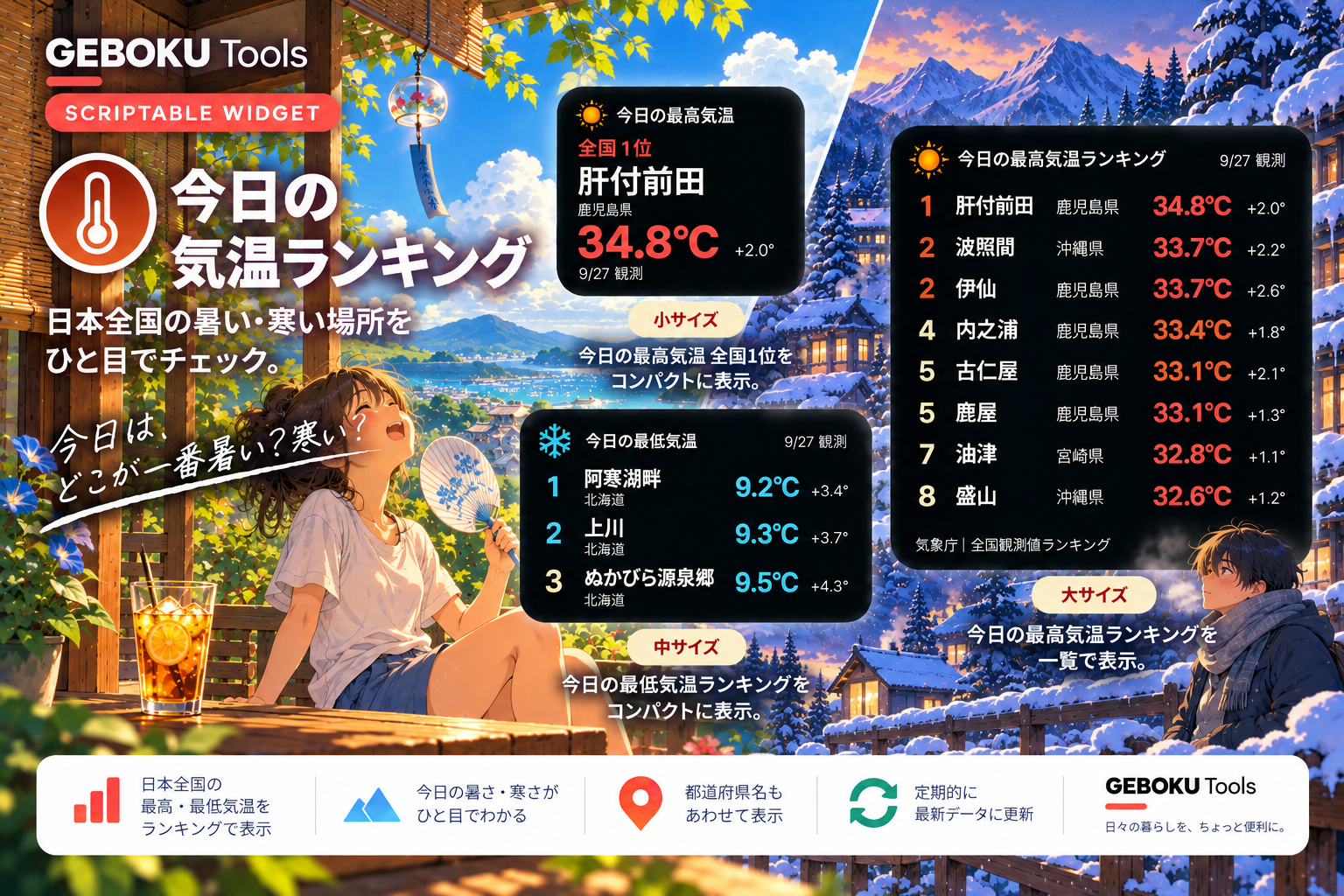
今日、日本で一番暑い場所はどこ?
「今日の気温ランキング」は、全国の観測地点から、その日の最高気温・最低気温ランキングを表示できるScriptable用ウィジェットです。
夏になるとニュースで「今日、日本で一番暑かったのは○○でした」と紹介されることがありますが、1位だけじゃなく「他はどこ?」「何℃だった?」まで見てみると意外と面白い。
それなら、全国の気温ランキングをホーム画面からいつでも見られるようにしようと思って作りました。
気象庁が公開している「毎日の全国観測値ランキング」を取得し、観測地点・都道府県・気温をランキング形式で表示します。
Parameter(パラメータ)を変更すれば、最高気温ランキング/最低気温ランキングを切り替えて表示でき、前日との差も確認できます。
データは気象庁の発表に合わせて更新されるため、リアルタイムの気温ランキングではありません。
また、当日のランキングがまだ公開されていない場合は、前日のランキングを自動で表示します。
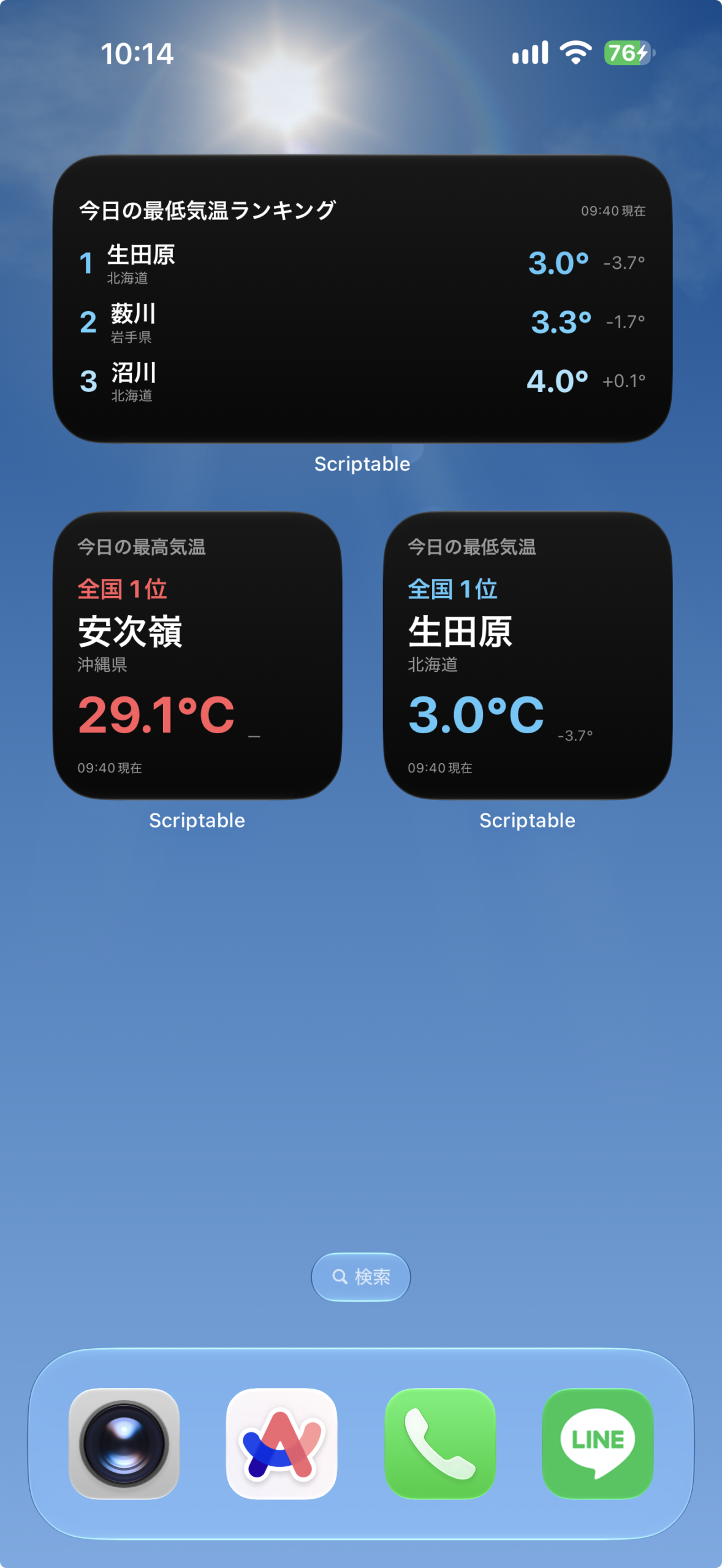
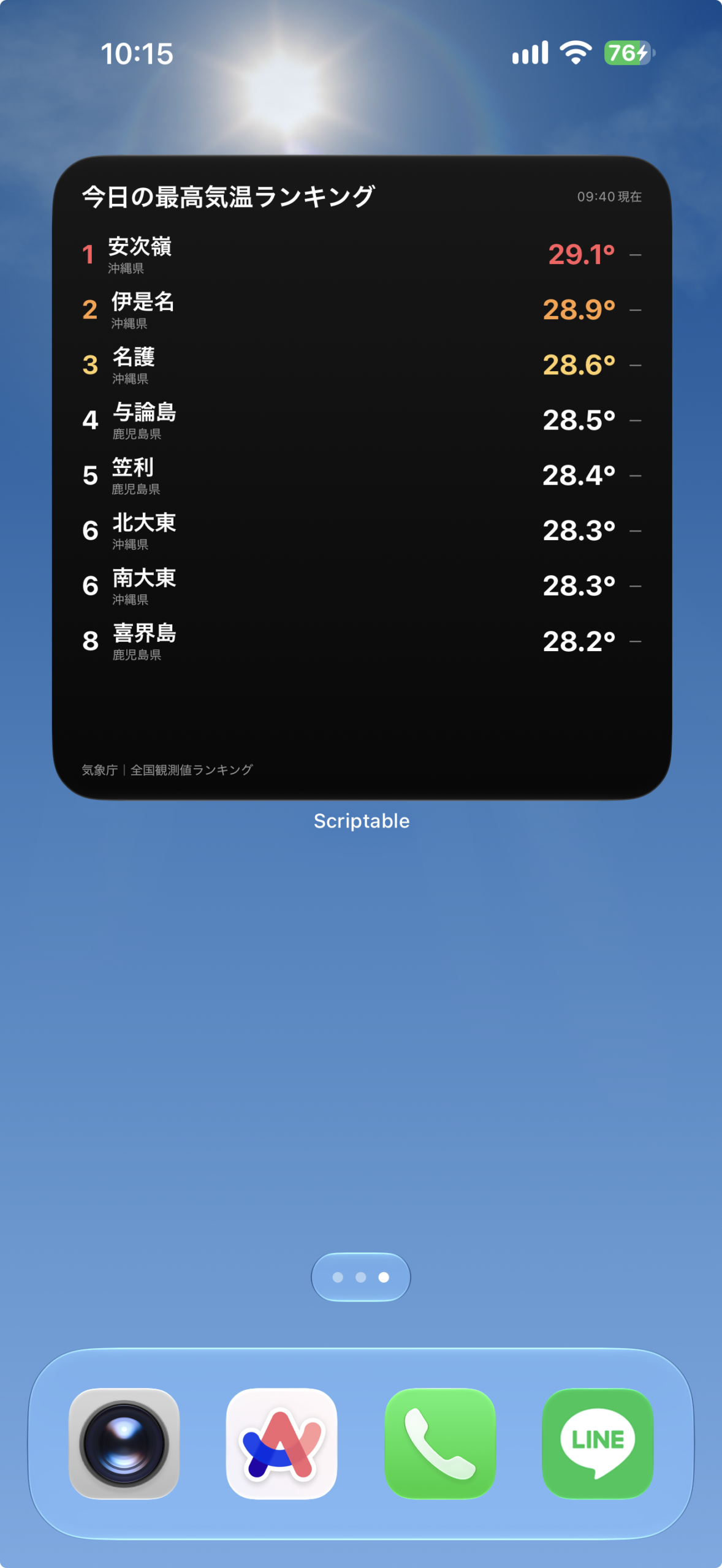
ウィジェットの表示内容
気象庁の全国ランキングを読み込み、選択した最高・最低気温を表示します。
サイズごとの表示
- 小:最高気温または最低気温の1位を表示します。
- 中:上位3地点を表示します。
- 大:上位8地点を表示します。取得できる場合は各地点の前日差も確認できます。
設定手順
上から順に進めてください。コードの保存と設定のコピーに必要な操作欄は、それぞれの手順の中にあります。
- Scriptableを用意する
App StoreでScriptableを開き、iPhoneにインストールします。すでに入っている場合は次へ進んでください。
- コードをコピーして保存する
下のコード欄の「コピー」を押します。Scriptableへ移動し、「+」から新しいスクリプトを作ってコード全文を貼り付け、今日の気温ランキングなどの名前で保存してください。
保存したらこのページに戻り、次の手順へ進みます。
// Variables used by Scriptable. // These must be at the very top of the file. Do not edit. // icon-color: deep-blue; icon-glyph: thermometer-half; // Version: 1.1.1 // ===================================================== // 今日の気温ランキング - Scriptable Widget // // Parameter: // 最高 → 日最高気温の高い方から // 最低 → 日最低気温の低い方から // // 未入力 → 最高 // // 小:1位 // 中:TOP3 // 大:TOP8 // // データ:気象庁「毎日の全国観測値ランキング」 // // 日付変更直後など、当日のランキングが // まだ公開されていない場合は前日へ自動フォールバック。 // // 前日差: // 最高 → 気象庁が14時以降に公開 // 最低 → 気象庁が 6時以降に公開 // // 公開前は「—」表示 // ===================================================== // ===================================================== // Parameter // ===================================================== const rawParam = (args.widgetParameter || "").trim(); const MODE = rawParam === "最低" ? "最低" : "最高"; // ===================================================== // 現在日時 // ===================================================== const now = new Date(); // ===================================================== // 気象庁 // ===================================================== const JMA_PAGE = "https://www.data.jma.go.jp/stats/data/mdrr/rank_daily/index.html"; function getJmaUrl(date) { const MM = String( date.getMonth() + 1 ).padStart(2, "0"); const DD = String( date.getDate() ).padStart(2, "0"); return ( "https://www.data.jma.go.jp/" + "stats/data/mdrr/rank_daily/" + `data${MM}${DD}.html` ); } // ===================================================== // モード設定 // ===================================================== const SETTINGS = { 最高: { heading: "日最高気温の高い方から", nextHeading: "日最低気温の低い方から", title: "最高気温ランキング", shortTitle: "最高気温", accent: new Color("#FF5A5F"), accent2: new Color("#FF9F43"), accent3: new Color("#FFD166") }, 最低: { heading: "日最低気温の低い方から", nextHeading: "日最高気温の低い方から", title: "最低気温ランキング", shortTitle: "最低気温", accent: new Color("#5AC8FA"), accent2: new Color("#64D2FF"), accent3: new Color("#A7E4FF") } }; const SETTING = SETTINGS[MODE]; // ===================================================== // カラー // ===================================================== const COLOR = { bgTop: new Color("#181818"), bgBottom: new Color("#080808"), text: Color.white(), subText: new Color("#999999"), diff: new Color("#8E8E93") }; // ===================================================== // HTMLデコード // ===================================================== function decodeHTML(text) { return String(text || "") .replace( /<br\s*\/?>/gi, " " ) .replace( /<[^>]*>/g, "" ) .replace( / /gi, " " ) .replace( /&/gi, "&" ) .replace( /</gi, "<" ) .replace( />/gi, ">" ) .replace( /"/gi, "\"" ) .replace( /'/gi, "'" ) .replace( /−/gi, "-" ) .replace( /−/gi, "-" ) .replace( /−/gi, "-" ) .replace( /&#x([0-9a-f]+);/gi, (_, hex) => String.fromCharCode( parseInt(hex, 16) ) ) .replace( /&#([0-9]+);/g, (_, num) => String.fromCharCode( parseInt(num, 10) ) ) .replace( /\s+/g, " " ) .trim(); } // ===================================================== // 地点名整理 // ===================================================== function cleanPlace(text) { return decodeHTML(text) .replace( /(.*$/, "" ) .replace( /\*/g, "" ) .trim(); } // ===================================================== // 都道府県整理 // ===================================================== function cleanPrefecture(text) { const value = decodeHTML(text); if ( value.startsWith("北海道") ) { return "北海道"; } return value; } // ===================================================== // 数値取得 // ===================================================== function getNumber(text) { const value = decodeHTML(text); const match = value.match( /[+-]?\d+(?:\.\d+)?/ ); if (!match) { return null; } const number = Number( match[0] ); return Number.isFinite(number) ? number : null; } // ===================================================== // 更新時刻 // ===================================================== function getUpdateTime(html) { const text = decodeHTML(html); const match = text.match( /(\d{1,2})時(\d{2})分現在/ ); if (!match) { return ""; } const hour = String( match[1] ).padStart( 2, "0" ); const minute = String( match[2] ).padStart( 2, "0" ); return `${hour}:${minute}現在`; } // ===================================================== // 前日差解析 // ===================================================== function parseDiff(cells) { // 公開待ち const waiting = cells.some( cell => cell.includes( "までお待ちください" ) ); if (waiting) { return null; } // 通常時 if ( cells.length < 8 ) { return null; } const diffText = cells[7]; // 日付だった場合は除外 if ( /\d{4}\/\d{2}\/\d{2}/.test( diffText ) ) { return null; } const diff = getNumber( diffText ); if ( diff === null || Math.abs(diff) > 20 ) { return null; } return diff; } // ===================================================== // HTML取得 // ===================================================== async function loadHTML(date) { const url = getJmaUrl(date); const request = new Request(url); request.headers = { "User-Agent": "Mozilla/5.0 (iPhone; CPU iPhone OS 18_0 like Mac OS X)" }; request.timeoutInterval = 15; return await request.loadString(); } // ===================================================== // ランキング解析 // ===================================================== function parseRanking( html, date ) { // =================================================== // 対象ランキング // =================================================== const start = html.indexOf( SETTING.heading ); if ( start === -1 ) { throw new Error( `${SETTING.title}が見つかりません` ); } const after = html.substring(start); const end = after.indexOf( SETTING.nextHeading ); const section = end >= 0 ? after.substring( 0, end ) : after; // =================================================== // 行 // =================================================== const rows = section.match( /<tr\b[^>]*>[\s\S]*?<\/tr>/gi ) || []; const ranking = []; let lastRank = null; for ( const row of rows ) { const cells = []; const regex = /<t[dh]\b[^>]*>([\s\S]*?)<\/t[dh]>/gi; let match; while ( ( match = regex.exec(row) ) !== null ) { cells.push( decodeHTML( match[1] ) ); } if ( cells.length < 5 ) { continue; } // ================================================= // 順位 // ================================================= const rankText = cells[0].trim(); let rank; if ( rankText === "〃" || rankText.includes("〃") ) { if ( lastRank === null ) { continue; } rank = lastRank; } else { const rankMatch = rankText.match( /^\d+/ ); if (!rankMatch) { continue; } rank = Number( rankMatch[0] ); lastRank = rank; } // ================================================= // 基本データ // ================================================= const prefecture = cleanPrefecture( cells[1] ); const place = cleanPlace( cells[3] ); const temperature = getNumber( cells[4] ); if ( temperature === null || !place ) { continue; } // ================================================= // 前日差 // ================================================= const diff = parseDiff( cells ); ranking.push({ rank, prefecture, place, temperature, diff }); if ( ranking.length >= 8 ) { break; } } if ( ranking.length === 0 ) { throw new Error( "ランキングデータを解析できませんでした" ); } return { ranking, updateTime: getUpdateTime( html ), date }; } // ===================================================== // ランキング取得 // // 1. 今日 // 2. 今日が未公開・取得失敗なら昨日 // ===================================================== async function fetchRanking() { // =================================================== // 今日 // =================================================== try { const html = await loadHTML( now ); const result = parseRanking( html, now ); result.isYesterday = false; return result; } catch (error) { console.log( "今日のランキング取得失敗:" ); console.log( String(error) ); } // =================================================== // 昨日 // =================================================== const yesterday = new Date( now ); yesterday.setDate( yesterday.getDate() - 1 ); try { const html = await loadHTML( yesterday ); const result = parseRanking( html, yesterday ); result.isYesterday = true; return result; } catch (error) { console.log( "昨日のランキング取得失敗:" ); console.log( String(error) ); throw new Error( "今日・昨日ともランキングデータを取得できませんでした" ); } } // ===================================================== // 前日差表示 // ===================================================== function formatDiff(value) { if ( value === null || value === undefined || !Number.isFinite(value) ) { return "—"; } if ( Math.abs(value) < 0.05 ) { return "±0.0°"; } if ( value > 0 ) { return ( `+${value.toFixed(1)}°` ); } return ( `${value.toFixed(1)}°` ); } // ===================================================== // 背景 // ===================================================== function setBackground(widget) { const gradient = new LinearGradient(); gradient.colors = [ COLOR.bgTop, COLOR.bgBottom ]; gradient.locations = [ 0, 1 ]; widget.backgroundGradient = gradient; } // ===================================================== // 順位カラー // ===================================================== function rankColor(rank) { if ( rank === 1 ) { return SETTING.accent; } if ( rank === 2 ) { return SETTING.accent2; } if ( rank === 3 ) { return SETTING.accent3; } return COLOR.text; } // ===================================================== // 気温+前日差 // ===================================================== function addTemperature( row, item, fontSize ) { const temp = row.addText( `${item.temperature.toFixed(1)}°` ); temp.font = Font.boldSystemFont( fontSize ); temp.textColor = rankColor( item.rank ); temp.lineLimit = 1; row.addSpacer(8); const diff = row.addText( formatDiff( item.diff ) ); diff.font = Font.systemFont( Math.max( 8, fontSize - 8 ) ); diff.textColor = COLOR.diff; diff.lineLimit = 1; } // ===================================================== // 表示日 // ===================================================== function getDayLabel( isYesterday ) { return isYesterday ? "昨日" : "今日"; } // ===================================================== // 小サイズ // ===================================================== function createSmall( data, updateTime, isYesterday ) { const widget = new ListWidget(); setBackground( widget ); widget.setPadding( 15, 15, 15, 15 ); const item = data[0]; const dayLabel = getDayLabel( isYesterday ); // タイトル const title = widget.addText( `${dayLabel}の${SETTING.shortTitle}` ); title.font = Font.boldSystemFont( 12 ); title.textColor = COLOR.subText; widget.addSpacer(); // 1位 const rank = widget.addText( "全国 1位" ); rank.font = Font.boldSystemFont( 15 ); rank.textColor = SETTING.accent; widget.addSpacer(3); // 地点 const place = widget.addText( item.place ); place.font = Font.boldSystemFont( 23 ); place.textColor = COLOR.text; place.minimumScaleFactor = 0.55; place.lineLimit = 1; // 都道府県 const pref = widget.addText( item.prefecture ); pref.font = Font.systemFont( 11 ); pref.textColor = COLOR.subText; pref.lineLimit = 1; widget.addSpacer(5); // 気温 const tempRow = widget.addStack(); tempRow.bottomAlignContent(); const temp = tempRow.addText( `${item.temperature.toFixed(1)}℃` ); temp.font = Font.boldSystemFont( 31 ); temp.textColor = SETTING.accent; temp.minimumScaleFactor = 0.6; temp.lineLimit = 1; tempRow.addSpacer(7); // 前日差 const diff = tempRow.addText( formatDiff( item.diff ) ); diff.font = Font.systemFont( 9 ); diff.textColor = COLOR.diff; widget.addSpacer(); // 更新 const update = widget.addText( updateTime || "更新時刻不明" ); update.font = Font.systemFont( 8 ); update.textColor = COLOR.subText; widget.url = JMA_PAGE; return widget; } // ===================================================== // 中サイズ // ===================================================== function createMedium( data, updateTime, isYesterday ) { const widget = new ListWidget(); setBackground( widget ); widget.setPadding( 14, 16, 12, 16 ); const dayLabel = getDayLabel( isYesterday ); // ヘッダー const header = widget.addStack(); header.centerAlignContent(); const title = header.addText( `${dayLabel}の${SETTING.title}` ); title.font = Font.boldSystemFont( 14 ); title.textColor = COLOR.text; header.addSpacer(); const update = header.addText( updateTime || "更新時刻不明" ); update.font = Font.systemFont( 8 ); update.textColor = COLOR.subText; widget.addSpacer(9); // TOP3 const count = Math.min( 3, data.length ); for ( let i = 0; i < count; i++ ) { const item = data[i]; const row = widget.addStack(); row.centerAlignContent(); // 順位 const rank = row.addText( `${item.rank}` ); rank.font = Font.boldSystemFont( 18 ); rank.textColor = rankColor( item.rank ); rank.size = new Size( 25, 20 ); row.addSpacer(8); // 地点 const location = row.addStack(); location.layoutVertically(); const place = location.addText( item.place ); place.font = Font.boldSystemFont( 15 ); place.textColor = COLOR.text; place.minimumScaleFactor = 0.65; place.lineLimit = 1; const pref = location.addText( item.prefecture ); pref.font = Font.systemFont( 9 ); pref.textColor = COLOR.subText; pref.lineLimit = 1; row.addSpacer(); // 気温+前日差 addTemperature( row, item, 19 ); if ( i < count - 1 ) { widget.addSpacer(7); } } widget.url = JMA_PAGE; return widget; } // ===================================================== // 大サイズ // ===================================================== function createLarge( data, updateTime, isYesterday ) { const widget = new ListWidget(); setBackground( widget ); widget.setPadding( 16, 18, 14, 18 ); const dayLabel = getDayLabel( isYesterday ); // ヘッダー const header = widget.addStack(); header.centerAlignContent(); const title = header.addText( `${dayLabel}の${SETTING.title}` ); title.font = Font.boldSystemFont( 16 ); title.textColor = COLOR.text; header.addSpacer(); const update = header.addText( updateTime || "更新時刻不明" ); update.font = Font.systemFont( 8 ); update.textColor = COLOR.subText; widget.addSpacer(12); // TOP8 const count = Math.min( 8, data.length ); for ( let i = 0; i < count; i++ ) { const item = data[i]; const row = widget.addStack(); row.centerAlignContent(); // 順位 const rank = row.addText( `${item.rank}` ); rank.font = Font.boldSystemFont( 16 ); rank.textColor = rankColor( item.rank ); rank.size = new Size( 25, 20 ); row.addSpacer(8); // 地点+都道府県 const location = row.addStack(); location.layoutVertically(); const place = location.addText( item.place ); place.font = Font.boldSystemFont( 14 ); place.textColor = COLOR.text; place.minimumScaleFactor = 0.65; place.lineLimit = 1; const pref = location.addText( item.prefecture ); pref.font = Font.systemFont( 8 ); pref.textColor = COLOR.subText; pref.lineLimit = 1; row.addSpacer(); // 気温+前日差 addTemperature( row, item, 17 ); if ( i < count - 1 ) { widget.addSpacer(7); } } widget.addSpacer(); // データ元 const source = widget.addText( "気象庁|全国観測値ランキング" ); source.font = Font.systemFont( 8 ); source.textColor = COLOR.subText; widget.url = JMA_PAGE; return widget; } // ===================================================== // エラー // ===================================================== function createErrorWidget( error ) { const widget = new ListWidget(); setBackground( widget ); widget.setPadding( 16, 16, 16, 16 ); widget.addSpacer(); const title = widget.addText( "データを取得できません" ); title.font = Font.boldSystemFont( 14 ); title.textColor = COLOR.text; widget.addSpacer(6); const message = widget.addText( String( error.message || error ) ); message.font = Font.systemFont( 9 ); message.textColor = COLOR.subText; widget.addSpacer(); return widget; } // ===================================================== // MAIN // ===================================================== let widget; try { const result = await fetchRanking(); const ranking = result.ranking; const updateTime = result.updateTime; const isYesterday = result.isYesterday; console.log( isYesterday ? "前日のランキングを表示" : "当日のランキングを表示" ); if ( config.widgetFamily === "small" ) { widget = createSmall( ranking, updateTime, isYesterday ); } else if ( config.widgetFamily === "large" ) { widget = createLarge( ranking, updateTime, isYesterday ); } else { widget = createMedium( ranking, updateTime, isYesterday ); } // 約1時間後を更新候補に widget.refreshAfterDate = new Date( Date.now() + 60 * 60 * 1000 ); } catch (error) { console.error( error ); widget = createErrorWidget( error ); // エラー時は30分後に再試行 widget.refreshAfterDate = new Date( Date.now() + 30 * 60 * 1000 ); } // ===================================================== // プレビュー // ===================================================== if ( !config.runsInWidget ) { if ( config.widgetFamily === "small" ) { await widget.presentSmall(); } else if ( config.widgetFamily === "large" ) { await widget.presentLarge(); } else { await widget.presentMedium(); } } // ===================================================== // 完了 // ===================================================== Script.setWidget( widget ); Script.complete(); - Parameterに設定を入力する
ウィジェットを長押しして「ウィジェットを編集」を開き、「Parameter」に
最高または最低を入力します。空欄の場合は最高気温を表示します。切り替えるときは、この文字だけを書き換えてください。 - ホーム画面に追加して設定する
iPhoneのホーム画面を長押しし、ウィジェット追加画面からScriptableを選びます。この記事の対応サイズの説明に合わせてサイズを選んで追加してください。
追加したウィジェットを長押しして「ウィジェットを編集」を開き、「Script」に保存したスクリプトを選びます。
「Parameter」に上で案内した値を直接入力します。 設定を変えるときは、この欄を書き換えてください。
編集画面を閉じて表示を確認します。ホーム画面への反映には少し時間がかかる場合があります。
最高・最低を両方表示する場合
最高気温と最低気温を両方チェックしたい場合は、ホーム画面にScriptableウィジェットを2つ配置して、各パラメータの設定を最高と最低に設定します。
スクリプトを2つ作成する必要はありません。
前日差の表示について
気温の横には、前日との気温差を小さく表示しています。
前日差は気象庁が公開しているデータを使用しており、最低気温は6時以降、最高気温は14時以降に順次公開されます。
そのため、公開時刻より前は前日差が「—」と表示されますが、不具合ではありません。
気象庁側でデータが公開されると、ウィジェットの更新に合わせて自動的に表示されます。
なお、気温ランキング自体は前日差の公開を待たず、その時点で気象庁から発表されている当日の最新データを表示します。
動作確認・使用結果
| 確認した端末 | iPhone 17 ProMAX |
|---|---|
| iOS | iOS27 |
| Scriptable | 1.7.19 |
| 確認したサイズ | 小・中・大 |
| バージョン | 1.1.1 |
| 動作確認日 | 2026-09-30 |
表示・使用時のポイント
気象庁の全国ランキングを読み込み、選択した最高・最低気温を表示します。当日分がまだ公開されていない場合は前日のデータを使います。
更新履歴
1.1.1
- 当日分が未公開の場合、前日の最終ランキングを自動表示
- 前日データ表示中は「昨日の最高気温/最低気温」と表示
- 当日分が公開されると、自動的に最新ランキングへ切り替え
- データ取得エラー時の再取得処理を改善
1.1.0
- 中・大サイズのランキングをより見やすいレイアウトに変更
- 各観測地点の気温に「前日差」を追加
- 大サイズの表示をTOP8に変更し、文字を大きく見やすく調整
- 最低気温ランキングの順位カラーを調整
1.0.0
- 初回リリース
よくあるエラーと対処
- 確認すること
- 表示されない場合は、ウィジェット編集画面の「Script」に保存したスクリプトが選ばれているかも確認してください。コードを貼り直すときは全文を置き換えます。
- 今日ではなく昨日の日付になる
- 当日分の公開前は前日分を表示する仕様です。
- 前日差が「—」になる
- 比較に必要な同じ地点のデータを取得できない場合の表示です。
- 大サイズがTOP10ではない
- 現在の配布コードはTOP8です。表示件数はコードに合わせています。
注意事項・制限
- 取得日時と観測データの日付は別です。画面の日付を確認してください。
- 気象庁の公開内容やページ構造が変わると取得できない場合があります。
- ホーム画面の更新タイミングはiOSが管理するため、操作やデータの変更がすぐに反映されない場合があります。
データ提供・参考資料
気象庁 全国の観測値ランキング:全国の最高・最低気温を取得しています。
SHARE