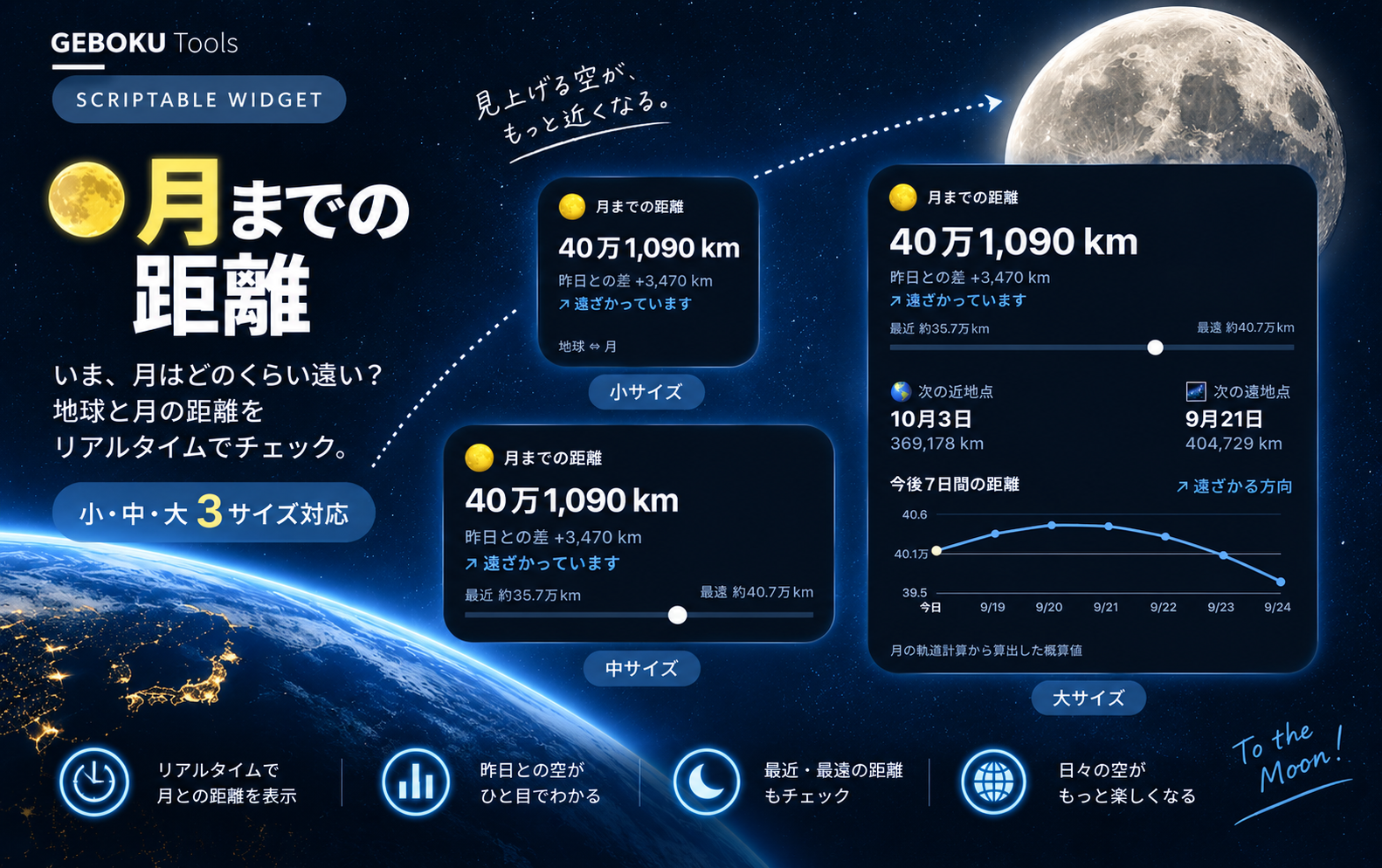
普段はあまり意識することのない「月との距離」を、ホーム画面から眺めて楽しめるウィジェットです。
月は地球のまわりを楕円軌道で回っているため、地球との距離は毎日少しずつ変化しています。
月までの距離は約38万kmというのは知っていても、「じゃあ今日はいったい何kmなんだろう?」と気になったのが、このウィジェットを作ったきっかけです。
現在の地球から月までの距離だけでなく、昨日からどれくらい変化したのか、月が地球に「近づいている」のか「遠ざかっている」のかもひと目で確認できます。
さらに大サイズでは、次の近地点・遠地点や、今後7日間の距離変化をグラフで表示。
このウィジェットで分かること
- 現在の地球から月までの距離
- 昨日からの距離の変化
- 月が近づいている/遠ざかっている
- 現在の距離が近地点〜遠地点のどのあたりか
- 次の近地点と予測距離
- 次の遠地点と予測距離
- 今後7日間の距離変化
位置情報やパラメーター設定は必要ありません。
下記のコードだけで月の軌道を計算して表示します。
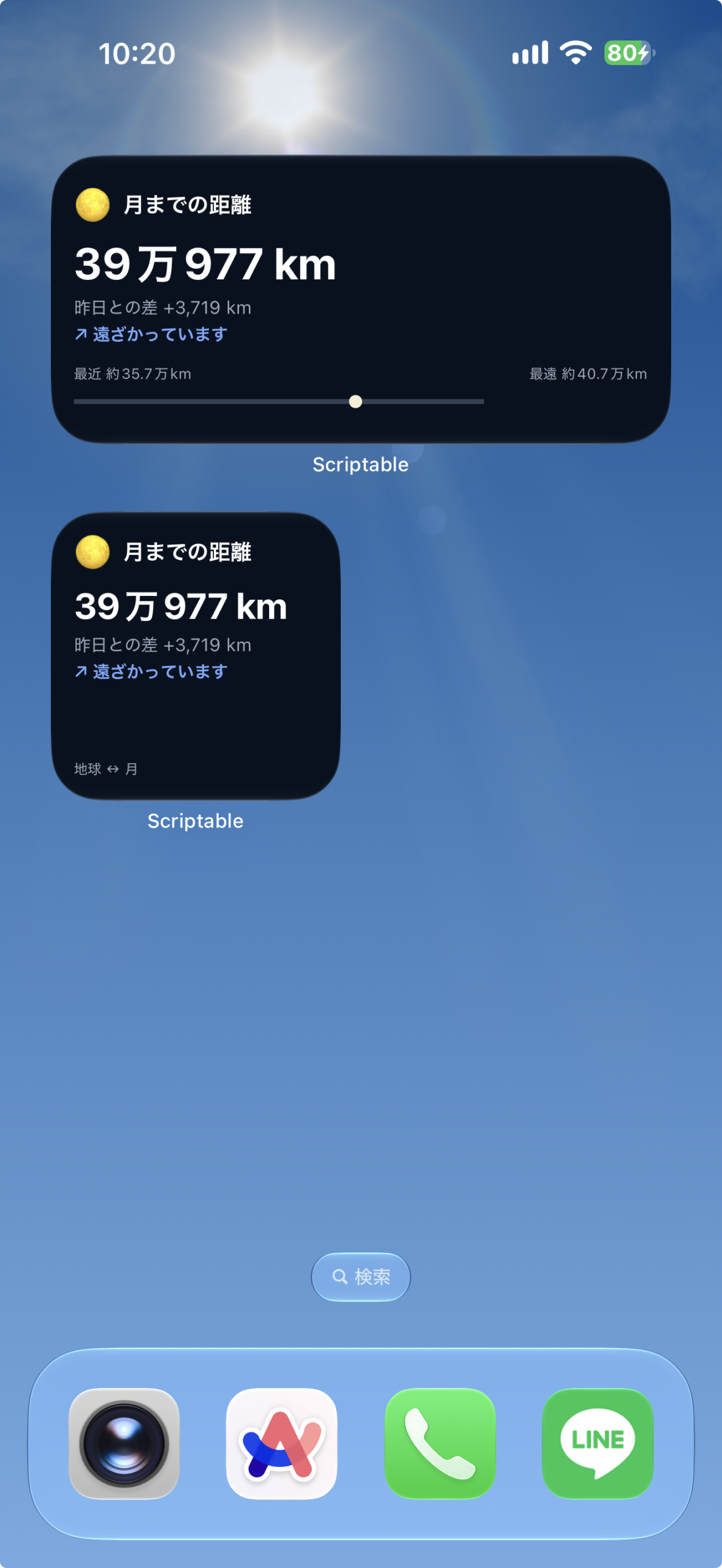
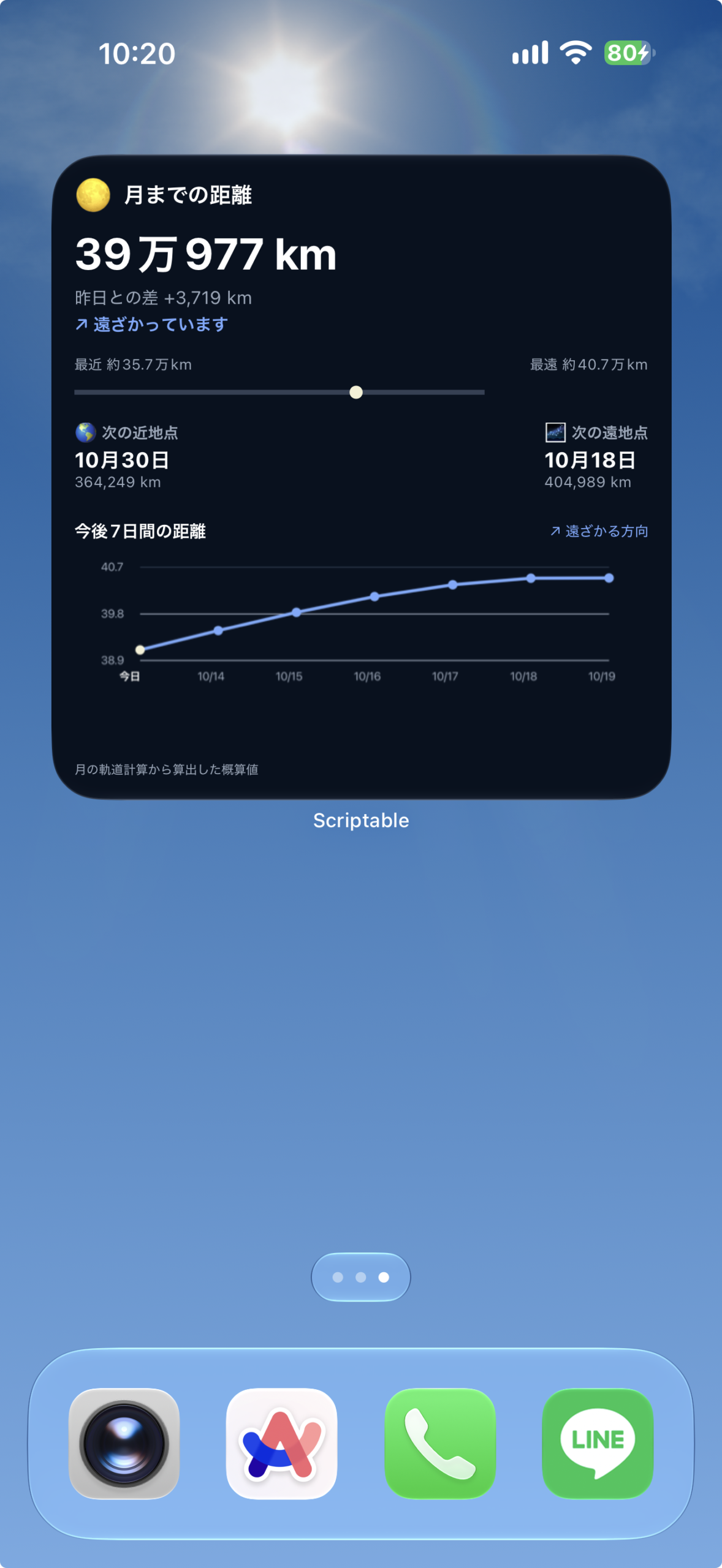
ウィジェットの表示内容
日付から月の軌道を近似計算し、距離と変化を求めます。
サイズごとの表示
- 小:月までの距離・前日からの変化・近づくか遠ざかるかを表示します。
- 中:近地点と遠地点の間での現在の位置をバーでも表示します。
- 大:次の近地点・遠地点の目安と、今後7日間の距離の変化を表示します。
設定手順
上から順に進めてください。コードの保存と設定のコピーに必要な操作欄は、それぞれの手順の中にあります。
- Scriptableを用意する
App StoreでScriptableを開き、iPhoneにインストールします。すでに入っている場合は次へ進んでください。
- コードをコピーして保存する
下のコード欄の「コピー」を押します。Scriptableへ移動し、「+」から新しいスクリプトを作ってコード全文を貼り付け、月と地球の距離などの名前で保存してください。
保存したらこのページに戻り、次の手順へ進みます。
// Version: 1.0.0 // ============================================================ // 月までの距離 - Scriptable Widget // API・APIキー不要 // // 小:現在距離 / 昨日との差 / 接近・遠ざかり // 中:小 + 近地点〜遠地点の現在位置 // 大:中 + 次の近地点・遠地点 + 今後7日間グラフ // ============================================================ // ============================================================ // 基本設定 // ============================================================ const NOW = new Date(); const COLORS = { background: new Color("#07111f"), text: new Color("#ffffff"), subText: new Color("#9aa8ba"), accent: new Color("#78aaff"), line: new Color("#334155"), moon: new Color("#f5f1d5"), graphLine: new Color("#78aaff"), graphGrid: new Color("#263448") }; // ============================================================ // 月の距離計算 // ============================================================ function moonDistance(date) { const d = date.getTime() / 86400000 - 10957.5; const N = normalize( 125.1228 - 0.0529538083 * d ); const w = normalize( 318.0634 + 0.1643573223 * d ); const a = 60.2666; const e = 0.054900; const M = normalize( 115.3654 + 13.0649929509 * d ); // 離心近点角 let E = M + (180 / Math.PI) * e * Math.sin(rad(M)) * (1 + e * Math.cos(rad(M))); for (let n = 0; n < 5; n++) { E = E - ( E - (180 / Math.PI) * e * Math.sin(rad(E)) - M ) / ( 1 - e * Math.cos(rad(E)) ); } // 軌道位置 const xv = a * ( Math.cos(rad(E)) - e ); const yv = a * Math.sqrt(1 - e * e) * Math.sin(rad(E)); const v = deg( Math.atan2(yv, xv) ); let r = Math.sqrt( xv * xv + yv * yv ); // 太陽位置 const ws = normalize( 282.9404 + 4.70935E-5 * d ); const Ms = normalize( 356.0470 + 0.9856002585 * d ); const Ls = normalize( ws + Ms ); // 月の平均黄経 const Lm = normalize( N + w + M ); // 平均離角 const D = normalize( Lm - Ls ); // 距離への主要摂動 r += -0.58 * Math.cos( rad(M - 2 * D) ) -0.46 * Math.cos( rad(2 * D) ); // km変換 return r * 6378.14; } // ============================================================ // 数学ユーティリティ // ============================================================ function rad(value) { return value * Math.PI / 180; } function deg(value) { return value * 180 / Math.PI; } function normalize(value) { value %= 360; if (value < 0) { value += 360; } return value; } // ============================================================ // 現在・昨日 // ============================================================ const currentDistance = moonDistance(NOW); const yesterday = new Date( NOW.getTime() - 86400000 ); const yesterdayDistance = moonDistance(yesterday); const difference = currentDistance - yesterdayDistance; // ============================================================ // 接近・遠ざかり // ============================================================ let directionText; let directionSymbol; if (difference > 0) { directionText = "遠ざかっています"; directionSymbol = "↗"; } else { directionText = "近づいています"; directionSymbol = "↘"; } // ============================================================ // 次の近地点・遠地点 // ============================================================ function findNextExtremes(startDate) { const STEP = 60 * 60 * 1000; const DAYS = 35; let previousDate = new Date(startDate); let previousDistance = moonDistance(previousDate); let currentDate = new Date( previousDate.getTime() + STEP ); let current = moonDistance(currentDate); let perigee = null; let apogee = null; for ( let i = 2; i < DAYS * 24; i++ ) { const nextDate = new Date( startDate.getTime() + i * STEP ); const next = moonDistance(nextDate); // 近地点 if ( !perigee && current < previousDistance && current < next ) { perigee = { date: new Date(currentDate), distance: current }; } // 遠地点 if ( !apogee && current > previousDistance && current > next ) { apogee = { date: new Date(currentDate), distance: current }; } if ( perigee && apogee ) { break; } previousDistance = current; current = next; currentDate = nextDate; } return { perigee, apogee }; } const extremes = findNextExtremes(NOW); // ============================================================ // フォーマット // ============================================================ function formatDistance(value) { return Math .round(value) .toLocaleString("ja-JP"); } function formatJapaneseDistance(value) { const km = Math.round(value); const man = Math.floor( km / 10000 ); const rest = km % 10000; return ( `${man}万${rest.toLocaleString("ja-JP")} km` ); } function formatDifference(value) { const rounded = Math.round(value); const sign = rounded >= 0 ? "+" : "−"; return ( sign + Math.abs(rounded) .toLocaleString("ja-JP") + " km" ); } function formatDate(date) { if (!date) { return "--"; } return ( `${date.getMonth() + 1}月` + `${date.getDate()}日` ); } // ============================================================ // 現在位置 // ============================================================ const MIN_DISTANCE = 356500; const MAX_DISTANCE = 406700; let ratio = ( currentDistance - MIN_DISTANCE ) / ( MAX_DISTANCE - MIN_DISTANCE ); ratio = Math.max( 0, Math.min( 1, ratio ) ); // ============================================================ // タイトル // ============================================================ function addTitle(widget) { const row = widget.addStack(); row.centerAlignContent(); const moon = row.addText("🌕"); moon.font = Font.systemFont(18); row.addSpacer(6); const title = row.addText( "月までの距離" ); title.font = Font.boldSystemFont(14); title.textColor = COLORS.text; } // ============================================================ // 現在距離 // ============================================================ function addDistance(widget, size) { widget.addSpacer(9); const distance = widget.addText( formatJapaneseDistance( currentDistance ) ); distance.font = Font.boldSystemFont( size === "small" ? 22 : 27 ); distance.textColor = COLORS.text; distance.minimumScaleFactor = 0.7; distance.lineLimit = 1; widget.addSpacer(4); const diff = widget.addText( `昨日との差 ${formatDifference(difference)}` ); diff.font = Font.systemFont(11); diff.textColor = COLORS.subText; widget.addSpacer(3); const direction = widget.addText( `${directionSymbol} ${directionText}` ); direction.font = Font.semiboldSystemFont(11); direction.textColor = COLORS.accent; } // ============================================================ // 現在位置バー // ============================================================ function addDistanceBar(widget) { widget.addSpacer(12); const labels = widget.addStack(); const near = labels.addText( "最近 約35.7万km" ); near.font = Font.systemFont(9); near.textColor = COLORS.subText; labels.addSpacer(); const far = labels.addText( "最遠 約40.7万km" ); far.font = Font.systemFont(9); far.textColor = COLORS.subText; widget.addSpacer(5); const width = 500; const height = 26; const context = new DrawContext(); context.size = new Size( width, height ); context.opaque = false; context.respectScreenScale = true; context.setFillColor( COLORS.line ); context.fillRect( new Rect( 0, 10, width, 6 ) ); const x = Math.max( 8, Math.min( width - 8, width * ratio ) ); context.setFillColor( COLORS.moon ); context.fillEllipse( new Rect( x - 8, 5, 16, 16 ) ); const image = context.getImage(); const imageView = widget.addImage(image); imageView.imageSize = new Size( 250, 13 ); } // ============================================================ // 近地点・遠地点 // ============================================================ function addExtremes(widget) { widget.addSpacer(12); const line = widget.addStack(); line.layoutHorizontally(); // ----------------------------- // 近地点 // ----------------------------- const near = line.addStack(); near.layoutVertically(); const nearTitle = near.addText( "🌎 次の近地点" ); nearTitle.font = Font.semiboldSystemFont(10); nearTitle.textColor = COLORS.subText; near.addSpacer(3); const nearDate = near.addText( formatDate( extremes.perigee?.date ) ); nearDate.font = Font.boldSystemFont(13); nearDate.textColor = COLORS.text; if (extremes.perigee) { const nearDistance = near.addText( `${formatDistance( extremes.perigee.distance )} km` ); nearDistance.font = Font.systemFont(9); nearDistance.textColor = COLORS.subText; } line.addSpacer(); // ----------------------------- // 遠地点 // ----------------------------- const far = line.addStack(); far.layoutVertically(); const farTitle = far.addText( "🌌 次の遠地点" ); farTitle.font = Font.semiboldSystemFont(10); farTitle.textColor = COLORS.subText; far.addSpacer(3); const farDate = far.addText( formatDate( extremes.apogee?.date ) ); farDate.font = Font.boldSystemFont(13); farDate.textColor = COLORS.text; if (extremes.apogee) { const farDistance = far.addText( `${formatDistance( extremes.apogee.distance )} km` ); farDistance.font = Font.systemFont(9); farDistance.textColor = COLORS.subText; } } // ============================================================ // 今後7日間のデータ // ============================================================ function getSevenDayData() { const data = []; for (let i = 0; i < 7; i++) { const date = new Date(NOW); date.setDate( date.getDate() + i ); data.push({ date: date, distance: moonDistance(date) }); } return data; } // ============================================================ // 7日間グラフ // ============================================================ function createSevenDayGraph(data) { const width = 1000; const height = 260; const left = 75; const right = 25; const top = 25; const bottom = 55; const graphWidth = width - left - right; const graphHeight = height - top - bottom; const values = data.map( item => item.distance ); // 7日間の実際の最大・最小に合わせる let min = Math.min(...values); let max = Math.max(...values); // 上下に余裕を持たせる const padding = Math.max( 1500, (max - min) * 0.15 ); min -= padding; max += padding; const context = new DrawContext(); context.size = new Size( width, height ); context.opaque = false; context.respectScreenScale = true; // ========================================================== // 横グリッド // ========================================================== context.setStrokeColor( COLORS.graphGrid ); context.setLineWidth(2); for (let i = 0; i < 3; i++) { const y = top + graphHeight * (i / 2); const path = new Path(); path.move( new Point( left, y ) ); path.addLine( new Point( width - right, y ) ); context.addPath(path); context.strokePath(); // 距離ラベル const value = max - (max - min) * (i / 2); context.setTextColor( COLORS.subText ); context.setFont( Font.systemFont(22) ); context.drawTextInRect( `${(value / 10000).toFixed(1)}万`, new Rect( 0, y - 14, left - 10, 30 ) ); } // ========================================================== // 各ポイント座標 // ========================================================== const points = data.map( (item, index) => { const x = left + graphWidth * ( index / (data.length - 1) ); const y = top + ( ( max - item.distance ) / ( max - min ) ) * graphHeight; return { x, y }; } ); // ========================================================== // 折れ線 // ========================================================== const graphPath = new Path(); graphPath.move( new Point( points[0].x, points[0].y ) ); for ( let i = 1; i < points.length; i++ ) { graphPath.addLine( new Point( points[i].x, points[i].y ) ); } context.setStrokeColor( COLORS.graphLine ); context.setLineWidth(6); context.addPath( graphPath ); context.strokePath(); // ========================================================== // ポイント // ========================================================== points.forEach( (point, index) => { context.setFillColor( index === 0 ? COLORS.moon : COLORS.graphLine ); context.fillEllipse( new Rect( point.x - 9, point.y - 9, 18, 18 ) ); } ); // ========================================================== // 日付 // ========================================================== data.forEach( (item, index) => { let label; if (index === 0) { label = "今日"; } else { label = `${item.date.getMonth() + 1}/${item.date.getDate()}`; } const x = points[index].x; context.setTextColor( index === 0 ? COLORS.text : COLORS.subText ); context.setFont( index === 0 ? Font.boldSystemFont(22) : Font.systemFont(22) ); context.drawTextInRect( label, new Rect( x - 40, height - 38, 80, 30 ) ); } ); return context.getImage(); } // ============================================================ // 7日間グラフを追加 // ============================================================ function addSevenDayGraph(widget) { widget.addSpacer(18); const titleRow = widget.addStack(); titleRow.centerAlignContent(); const title = titleRow.addText( "今後7日間の距離" ); title.font = Font.semiboldSystemFont(11); title.textColor = COLORS.text; titleRow.addSpacer(); const trend = titleRow.addText( difference > 0 ? "↗ 遠ざかる方向" : "↘ 近づく方向" ); trend.font = Font.systemFont(9); trend.textColor = COLORS.accent; widget.addSpacer(7); const data = getSevenDayData(); const graph = createSevenDayGraph(data); const image = widget.addImage(graph); image.imageSize = new Size( 320, 83 ); image.centerAlignImage(); } // ============================================================ // ウィジェット作成 // ============================================================ function createWidget() { const widget = new ListWidget(); widget.backgroundColor = COLORS.background; widget.setPadding( 14, 14, 14, 14 ); const family = config.widgetFamily || "medium"; // ========================================================== // SMALL // ========================================================== if (family === "small") { addTitle(widget); addDistance( widget, "small" ); widget.addSpacer(); const bottom = widget.addText( "地球 ↔ 月" ); bottom.font = Font.systemFont(9); bottom.textColor = COLORS.subText; } // ========================================================== // MEDIUM // ========================================================== else if (family === "medium") { addTitle(widget); addDistance( widget, "medium" ); addDistanceBar(widget); } // ========================================================== // LARGE // ========================================================== else { addTitle(widget); addDistance( widget, "large" ); addDistanceBar(widget); addExtremes(widget); addSevenDayGraph(widget); widget.addSpacer(); const note = widget.addText( "月の軌道計算から算出した概算値" ); note.font = Font.systemFont(8); note.textColor = COLORS.subText; } return widget; } // ============================================================ // 実行 // ============================================================ const widget = createWidget(); if (!config.runsInWidget) { const family = config.widgetFamily || "medium"; if (family === "small") { await widget.presentSmall(); } else if (family === "large") { await widget.presentLarge(); } else { await widget.presentMedium(); } } Script.setWidget(widget); Script.complete(); - ホーム画面に追加して設定する
iPhoneのホーム画面を長押しし、ウィジェット追加画面からScriptableを選びます。この記事の対応サイズの説明に合わせてサイズを選んで追加してください。
追加したウィジェットを長押しして「ウィジェットを編集」を開き、「Script」に保存したスクリプトを選びます。
「Parameter」は空欄で構いません。
編集画面を閉じて表示を確認します。ホーム画面への反映には少し時間がかかる場合があります。
月までの距離はどれくらい変わる
月と地球の平均距離は約38万kmですが、月の軌道は完全な円ではありません。
地球に近いときは約36万km前後、遠いときには約40万km前後まで離れます。
数万kmもの違いがあり、その途中でも距離は日々変化しています。
普段はあまり意識することのない**「今日の月は近いのか、遠いのか」**を、ホーム画面から毎日眺めて楽しめるウィジェットです。
動作確認・使用結果
| 確認した端末 | iPhone 17 ProMAX |
|---|---|
| iOS | iOS27 |
| Scriptable | 1.7.19 |
| 確認したサイズ | 小・中・大 |
| バージョン | 1.0.0 |
| 動作確認日 | 2026-09-18 |
表示・使用時のポイント
日付から月の軌道を近似計算し、距離と変化を求めます。ネットワークから観測値を取り込む方式ではありません。
更新履歴
1.0.0
- 初回リリース
よくあるエラーと対処
- 確認すること
- 表示されない場合は、ウィジェット編集画面の「Script」に保存したスクリプトが選ばれているかも確認してください。コードを貼り直すときは全文を置き換えます。
- 他の天文サイトと距離が違う
- 簡略化した軌道計算のため誤差があります。
- 近づく・遠ざかる表示が変わる
- 月が近地点や遠地点を通過すると方向が変わります。端末の日付が正しいかも確認してください。
注意事項・制限
- 表示される距離・近地点・遠地点などは、Scriptable内で月の軌道を計算して算出した概算値です。
- 天文観測や研究など、高精度な数値を必要とする用途ではなく、ホーム画面で月と地球の距離の変化を楽しむためのウィジェットとしてご利用ください。
- 表示する距離や近地点・遠地点の時期は概算です。
- 観測・研究など精密な値が必要な用途には使わないでください。
- ホーム画面の更新タイミングはiOSが管理するため、操作やデータの変更がすぐに反映されない場合があります。
データ提供・参考資料
計算方式:スクリプト内の月の軌道モデルと定数を使った近似計算です。外部の観測データを随時取得する方式ではありません。
SHARE