「今年って、もう何%くらい終わったんだろう?」
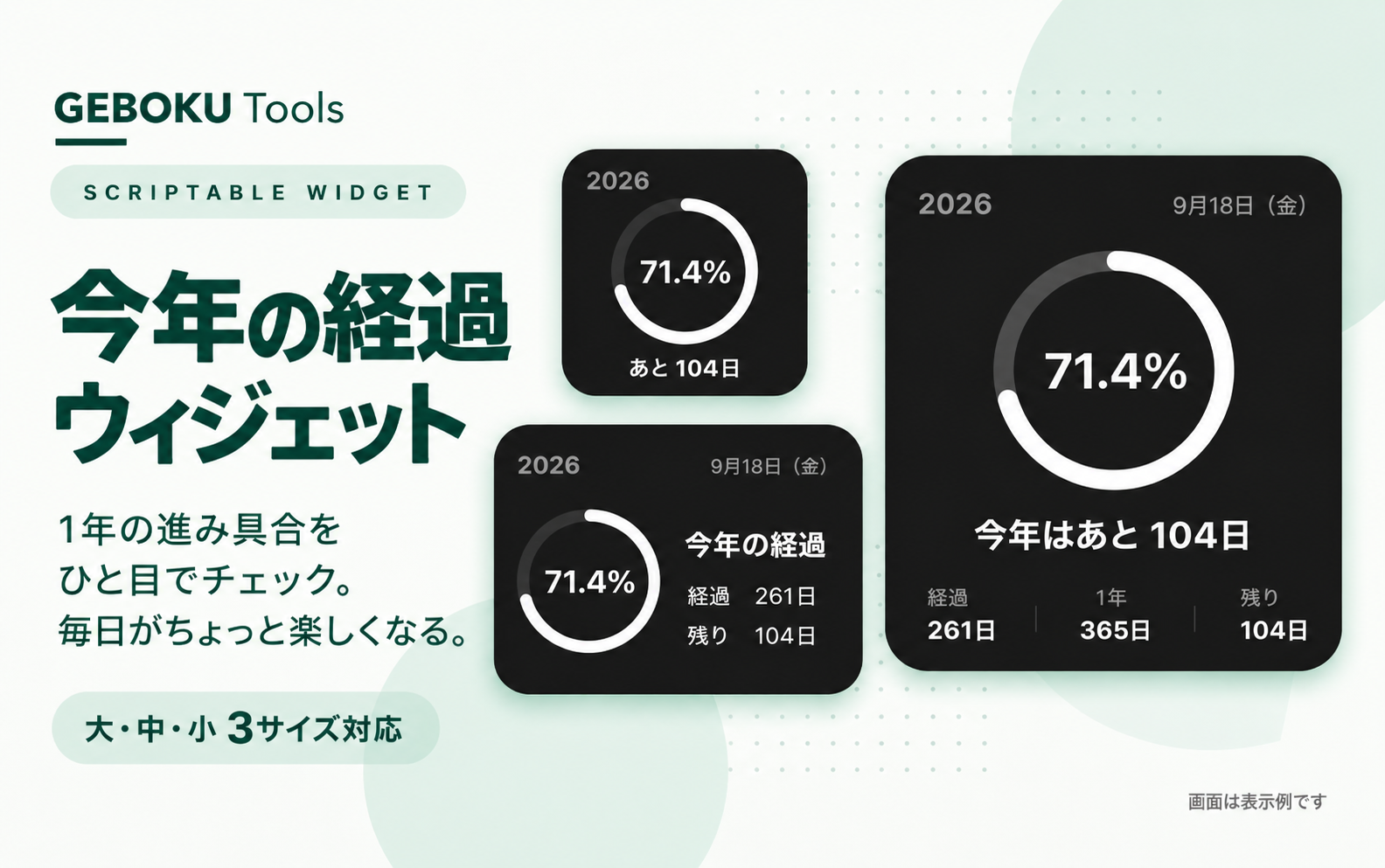
そんな1年の進み具合を、ホーム画面からひと目で確認できるScriptable用「今年何%?」ウィジェットです。
1年の経過をカレンダーで日数を見るより、1年そのものをプログレスバーみたいに表示したら面白いんじゃないかと思って作りました。
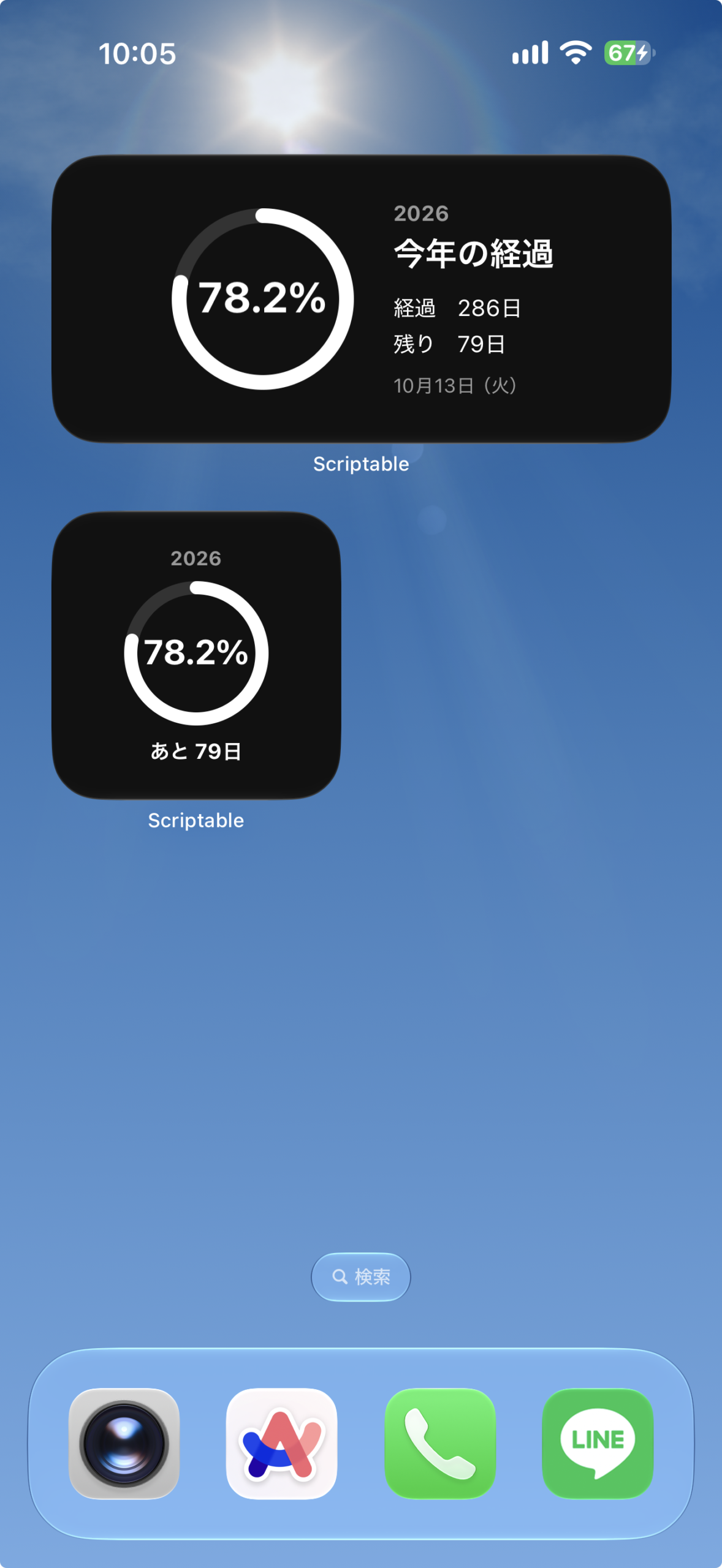
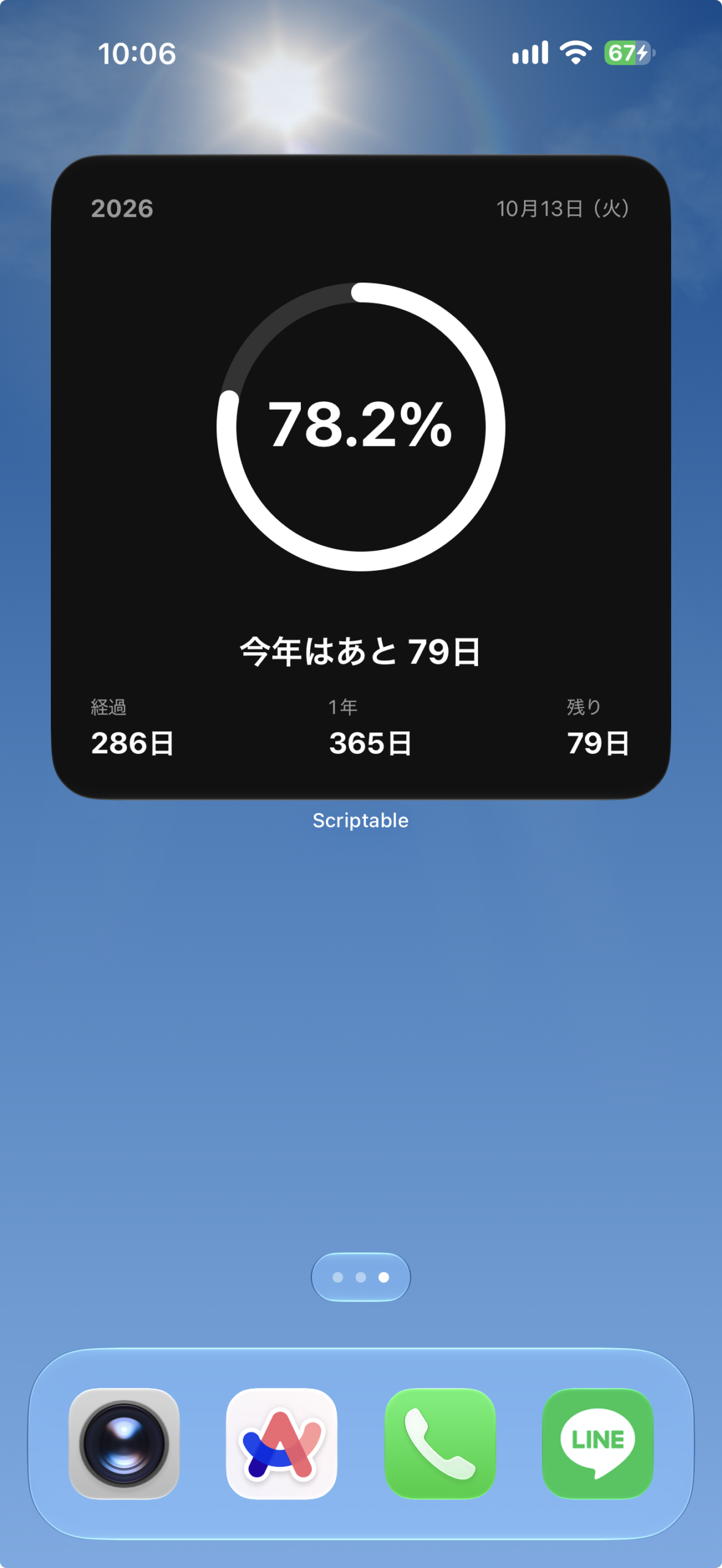
円形のプログレスリングで、今年の経過率を視覚的に表示。
中央には現在の経過率が「71.4%」のように表示されます。
経過率は日単位ではなく現在時刻まで含めて自動計算するので、1年が少しずつ進んでいく様子を確認できます。
ウィジェットの表示内容
端末の日付から年初・翌年の年初までの期間を計算します。
サイズごとの表示
- 小:今年の経過率と残り日数を表示します。
- 中:経過日数と今日の日付・曜日も確認できます。
- 大:1年の総日数を含め、年の進み具合を広く表示します。
設定手順
上から順に進めてください。コードの保存と設定のコピーに必要な操作欄は、それぞれの手順の中にあります。
- Scriptableを用意する
App StoreでScriptableを開き、iPhoneにインストールします。すでに入っている場合は次へ進んでください。
- コードをコピーして保存する
下のコード欄の「コピー」を押します。Scriptableへ移動し、「+」から新しいスクリプトを作ってコード全文を貼り付け、今年は何%などの名前で保存してください。
保存したらこのページに戻り、次の手順へ進みます。
// Version: 1.0.0 // ===================================================== // 今年何%? - Scriptable Widget // 小・中・大サイズ対応 // 現在時刻まで含めて今年の経過率を自動計算 // ===================================================== // ===================================================== // 基本設定 // ===================================================== const BG_COLOR = new Color("#111111"); const TEXT_COLOR = new Color("#FFFFFF"); const SUB_TEXT_COLOR = new Color("#999999"); const RING_COLOR = new Color("#FFFFFF"); const RING_BG_COLOR = new Color("#333333"); // ===================================================== // 日付・進捗計算 // ===================================================== const now = new Date(); const year = now.getFullYear(); const startOfYear = new Date(year, 0, 1, 0, 0, 0); const startOfNextYear = new Date(year + 1, 0, 1, 0, 0, 0); const MS_PER_DAY = 1000 * 60 * 60 * 24; // ----------------------------------------------------- // 今年の日数 // ----------------------------------------------------- const totalDays = Math.round( (startOfNextYear - startOfYear) / MS_PER_DAY ); // ----------------------------------------------------- // 今日が何日目か // ----------------------------------------------------- const currentDay = Math.floor( (now - startOfYear) / MS_PER_DAY ) + 1; // ----------------------------------------------------- // 現在時刻まで含めた今年の経過率 // ----------------------------------------------------- const elapsed = now - startOfYear; const total = startOfNextYear - startOfYear; const progress = Math.min( Math.max(elapsed / total, 0), 1 ); const percent = progress * 100; // ----------------------------------------------------- // 残り日数 // ----------------------------------------------------- const remainingDays = Math.max( totalDays - currentDay, 0 ); // ===================================================== // 日付表示 // ===================================================== const weekdays = [ "日", "月", "火", "水", "木", "金", "土" ]; const month = now.getMonth() + 1; const day = now.getDate(); const weekday = weekdays[now.getDay()]; const todayText = `${month}月${day}日(${weekday})`; // ===================================================== // 円形プログレス画像 // ===================================================== function createProgressRing( size, lineWidth, progress ) { const ctx = new DrawContext(); ctx.size = new Size(size, size); ctx.opaque = false; ctx.respectScreenScale = true; const center = size / 2; const radius = center - lineWidth / 2 - 2; // --------------------------------------------------- // 背景リング // --------------------------------------------------- ctx.setStrokeColor(RING_BG_COLOR); ctx.setLineWidth(lineWidth); const bgPath = new Path(); bgPath.addEllipse( new Rect( center - radius, center - radius, radius * 2, radius * 2 ) ); ctx.addPath(bgPath); ctx.strokePath(); // --------------------------------------------------- // 進捗リング // --------------------------------------------------- if (progress > 0) { ctx.setStrokeColor(RING_COLOR); ctx.setLineWidth(lineWidth); const startAngle = -Math.PI / 2; const endAngle = startAngle + Math.PI * 2 * progress; const segments = Math.max( 2, Math.ceil(200 * progress) ); const path = new Path(); for ( let i = 0; i <= segments; i++ ) { const ratio = i / segments; const angle = startAngle + (endAngle - startAngle) * ratio; const x = center + radius * Math.cos(angle); const y = center + radius * Math.sin(angle); if (i === 0) { path.move( new Point(x, y) ); } else { path.addLine( new Point(x, y) ); } } ctx.addPath(path); ctx.strokePath(); // ------------------------------------------------- // 始点と終点を丸くする // ------------------------------------------------- const capRadius = lineWidth / 2; ctx.setFillColor(RING_COLOR); // 始点 const startX = center + radius * Math.cos(startAngle); const startY = center + radius * Math.sin(startAngle); ctx.fillEllipse( new Rect( startX - capRadius, startY - capRadius, lineWidth, lineWidth ) ); // 終点 const endX = center + radius * Math.cos(endAngle); const endY = center + radius * Math.sin(endAngle); ctx.fillEllipse( new Rect( endX - capRadius, endY - capRadius, lineWidth, lineWidth ) ); } return ctx.getImage(); } // ===================================================== // リング+中央の% // ===================================================== function createRingWithPercent( ringSize, lineWidth, percentFontSize ) { const ringImage = createProgressRing( ringSize, lineWidth, progress ); const ctx = new DrawContext(); ctx.size = new Size( ringSize, ringSize ); ctx.opaque = false; ctx.respectScreenScale = true; // --------------------------------------------------- // リング // --------------------------------------------------- ctx.drawImageInRect( ringImage, new Rect( 0, 0, ringSize, ringSize ) ); // --------------------------------------------------- // 中央% // --------------------------------------------------- ctx.setTextColor(TEXT_COLOR); ctx.setFont( Font.boldSystemFont( percentFontSize ) ); ctx.setTextAlignedCenter(); const percentText = `${percent.toFixed(1)}%`; ctx.drawTextInRect( percentText, new Rect( 0, ringSize / 2 - percentFontSize * 0.65, ringSize, percentFontSize * 1.4 ) ); return ctx.getImage(); } // ===================================================== // 共通テキスト // ===================================================== function addText( stack, text, size, color, weight = "regular" ) { const t = stack.addText(text); if (weight === "bold") { t.font = Font.boldSystemFont(size); } else { t.font = Font.systemFont(size); } t.textColor = color; return t; } // ===================================================== // リング追加 // ===================================================== function addRing( parent, ringSize, lineWidth, percentFontSize ) { const image = createRingWithPercent( ringSize, lineWidth, percentFontSize ); const img = parent.addImage(image); img.imageSize = new Size( ringSize, ringSize ); } // ===================================================== // 小サイズ // ===================================================== function createSmallWidget() { const widget = new ListWidget(); widget.backgroundColor = BG_COLOR; widget.setPadding( 13, 13, 13, 13 ); // --------------------------------------------------- // 年 // --------------------------------------------------- const yearStack = widget.addStack(); yearStack.addSpacer(); addText( yearStack, `${year}`, 12, SUB_TEXT_COLOR, "bold" ); yearStack.addSpacer(); widget.addSpacer(5); // --------------------------------------------------- // リング // --------------------------------------------------- const ringStack = widget.addStack(); ringStack.addSpacer(); addRing( ringStack, 92, 8, 21 ); ringStack.addSpacer(); widget.addSpacer(6); // --------------------------------------------------- // 残り // --------------------------------------------------- const bottom = widget.addStack(); bottom.addSpacer(); addText( bottom, `あと ${remainingDays}日`, 13, TEXT_COLOR, "bold" ); bottom.addSpacer(); return widget; } // ===================================================== // 中サイズ // ===================================================== function createMediumWidget() { const widget = new ListWidget(); widget.backgroundColor = BG_COLOR; widget.setPadding( 18, 20, 18, 20 ); const main = widget.addStack(); main.layoutHorizontally(); main.centerAlignContent(); // --------------------------------------------------- // 左:リング // --------------------------------------------------- const left = main.addStack(); left.layoutVertically(); left.centerAlignContent(); addRing( left, 115, 9, 26 ); main.addSpacer(22); // --------------------------------------------------- // 右:情報 // --------------------------------------------------- const right = main.addStack(); right.layoutVertically(); addText( right, `${year}`, 13, SUB_TEXT_COLOR, "bold" ); right.addSpacer(4); addText( right, "今年の経過", 21, TEXT_COLOR, "bold" ); right.addSpacer(12); addText( right, `経過 ${currentDay}日`, 14, TEXT_COLOR ); right.addSpacer(5); addText( right, `残り ${remainingDays}日`, 14, TEXT_COLOR ); right.addSpacer(10); addText( right, todayText, 12, SUB_TEXT_COLOR ); return widget; } // ===================================================== // 大サイズ // ===================================================== function createLargeWidget() { const widget = new ListWidget(); widget.backgroundColor = BG_COLOR; widget.setPadding( 24, 24, 24, 24 ); // --------------------------------------------------- // ヘッダー // --------------------------------------------------- const header = widget.addStack(); header.centerAlignContent(); addText( header, `${year}`, 15, SUB_TEXT_COLOR, "bold" ); header.addSpacer(); addText( header, todayText, 13, SUB_TEXT_COLOR ); widget.addSpacer(); // --------------------------------------------------- // リング // --------------------------------------------------- const ringStack = widget.addStack(); ringStack.addSpacer(); addRing( ringStack, 180, 12, 38 ); ringStack.addSpacer(); widget.addSpacer(); // --------------------------------------------------- // 残り日数 // --------------------------------------------------- const title = widget.addStack(); title.addSpacer(); addText( title, `今年はあと ${remainingDays}日`, 21, TEXT_COLOR, "bold" ); title.addSpacer(); widget.addSpacer(14); // --------------------------------------------------- // 詳細情報 // --------------------------------------------------- const stats = widget.addStack(); stats.centerAlignContent(); // 経過 const passed = stats.addStack(); passed.layoutVertically(); passed.centerAlignContent(); addText( passed, "経過", 12, SUB_TEXT_COLOR ); passed.addSpacer(4); addText( passed, `${currentDay}日`, 18, TEXT_COLOR, "bold" ); stats.addSpacer(); // 1年 const totalStack = stats.addStack(); totalStack.layoutVertically(); totalStack.centerAlignContent(); addText( totalStack, "1年", 12, SUB_TEXT_COLOR ); totalStack.addSpacer(4); addText( totalStack, `${totalDays}日`, 18, TEXT_COLOR, "bold" ); stats.addSpacer(); // 残り const remaining = stats.addStack(); remaining.layoutVertically(); remaining.centerAlignContent(); addText( remaining, "残り", 12, SUB_TEXT_COLOR ); remaining.addSpacer(4); addText( remaining, `${remainingDays}日`, 18, TEXT_COLOR, "bold" ); return widget; } // ===================================================== // ウィジェットサイズ判定 // ===================================================== let widget; if (config.widgetFamily === "small") { widget = createSmallWidget(); } else if (config.widgetFamily === "large") { widget = createLargeWidget(); } else { widget = createMediumWidget(); } // ===================================================== // 自動更新 // ===================================================== // 約30分後に更新 // iOS側の判断により実際の更新時刻は前後します const refreshDate = new Date( Date.now() + 30 * 60 * 1000 ); widget.refreshAfterDate = refreshDate; // ===================================================== // 表示 // ===================================================== if (config.runsInWidget) { Script.setWidget(widget); } else { // Scriptableアプリから実行した場合は // 中サイズでプレビュー await widget.presentMedium(); } Script.complete(); - ホーム画面に追加して設定する
iPhoneのホーム画面を長押しし、ウィジェット追加画面からScriptableを選びます。この記事の対応サイズの説明に合わせてサイズを選んで追加してください。
追加したウィジェットを長押しして「ウィジェットを編集」を開き、「Script」に保存したスクリプトを選びます。
「Parameter」は空欄で構いません。
編集画面を閉じて表示を確認します。ホーム画面への反映には少し時間がかかる場合があります。
経過率について
1月1日から12月31日までを100%として、今日までに今年が何%経過したのかを自動計算します。
例えば年の半分まで来れば約50%、年末が近づくにつれて100%へ近づいていきます。
うるう年にも対応し、その年の日数をもとに計算します。
日付が変わると経過率も自動的に更新されるため、毎日の設定変更は必要ありません。
動作確認・使用結果
| 確認した端末 | iPhone 17 ProMAX |
|---|---|
| iOS | iOS27 |
| Scriptable | 1.7.19 |
| 確認したサイズ | 小・中・大 |
| バージョン | 1.0.0 |
| 動作確認日 | 2026-09-18 |
表示・使用時のポイント
端末の日付から年初・翌年の年初までの期間を計算します。うるう年もその年の日数に合わせて経過率を求めます。
更新履歴
1.0.0
- 初回リリース
よくあるエラーと対処
- 確認すること
- 表示されない場合は、ウィジェット編集画面の「Script」に保存したスクリプトが選ばれているかも確認してください。コードを貼り直すときは全文を置き換えます。
- 別の日付や不自然な経過率が出る
- 端末の日付・時刻が正しいか確認してください。
- 数字がすぐに変わらない
- ホーム画面は常時再計算しません。Scriptableで実行し、次の更新を待ってください。
注意事項・制限
- 1年の進み具合を眺めるための表示で、予定の管理や通知は行いません。
- 年が変わると新しい年の経過率に切り替わります。
- ホーム画面の更新タイミングはiOSが管理するため、操作やデータの変更がすぐに反映されない場合があります。
データ提供・参考資料
このウィジェットにはデータ提供や参考資料は特にありません。
SHARE